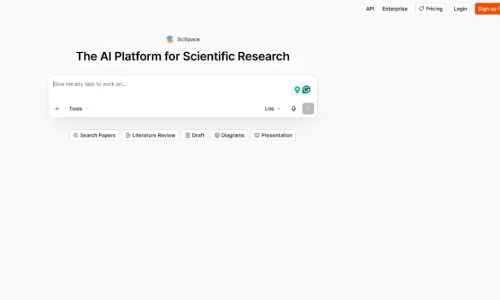
SciSpace AI helps students and researchers discover academic papers, understand complex studies, summarize PDFs, and organize literature reviews. It combines AI-powered research tools, paper analysis, and citation support in one workspace, with free and paid plans available.
What Is SciSpace AI?
SciSpace is made by PubGenius Inc., a company with Indian roots founded by Saikiran Chandha (CEO) and Shanu Kumar. It started life as Typeset, a tool for formatting research papers, and rebranded to SciSpace in 2022 as it moved into AI-powered discovery and reading.
| Fact | Detail |
| Developer | PubGenius Inc. (formerly Typeset) |
| Founders | Saikiran Chandha and Shanu Kumar |
| Roots | Bengaluru, India; US office listed in Milpitas, California |
| Paper database | 280M+ papers |
| Key launches | Deep Review (Feb 2025), SciSpace Agent (Aug 2025), BioMed Agent (Dec 2025) |
| Pricing | Free Basic plan; paid plans 20–200/month |
What You Can Do With SciSpace
| Tool | What it does | Best used for |
| Literature Review | Answers a research question with a summary and a table of relevant papers | Getting a fast map of a topic |
| Deep Review | Multi-step, systematic-style search that refines your query and ranks papers | Thesis chapters and review articles |
| Chat with PDF (Copilot) | Explains text, maths and tables in any paper, and answers follow-up questions | Understanding dense papers |
| Extract Data | Compares papers across up to 50 parameters and exports to CSV, Excel, RIS, BIB or XML | Building an evidence matrix |
| SciSpace Agent | Runs search, summarising, figures and drafting from one prompt | Multi-step research tasks |
| AI Writer, Paraphraser, Citation Generator | Help with drafting and referencing | First drafts and reference lists |
| AI Detector | Estimates whether text is AI-generated | A rough check only (see below) |
You can also link SciSpace to Zotero to import your library, organise papers in folders, and use a browser extension while you read online.
SciSpace Agent: the “co-scientist”
Launched in August 2025, the SciSpace Agent is the platform’s centrepiece. Instead of opening five tools, you give it one prompt, such as “Find recent studies on microplastics in drinking water, summarise the methods, and draft a 500-word background section with citations.” It plans and runs the steps for you. A specialised BioMed Agent for life-sciences research followed in December 2025.
SciSpace Pricing in 2026
Here are the plans SciSpace listed as of 18 November 2026:
| Plan | Monthly | Billed yearly | What you get |
| Basic | Free | Free | 100 agent credits a month; limited features |
| Premium | $20 | 12/month(144/yr) | 1,200 credits; unlimited use of the Lite model, Pro model with rate limits, more paper sources, institutional full-text access |
| Advanced | $90 | 70/month(840/yr) | Access to the Pro and Expert models; Deep Review |
| Max | $200 | 160/month(1,920/yr) | Highest limits for heavy users |
| Teams / Enterprise | Custom | Custom | Admin controls and institutional deals |
Two things to know before paying:
- “Unlimited” on Premium means the Lite model. The more capable Pro and Expert models only come with full access from Advanced upwards.
- Credits reset each billing cycle. Unused credits don’t roll over, so buy for your busiest month, such as thesis season, not your average one.
Which plan fits whom?
| You are… | Start with | Upgrade when… |
| Undergraduate, a few papers a week | Basic | You run out of credits before the month ends |
| Master’s/PhD student writing a literature review | Premium (yearly) | You need Deep Review or the Pro model daily |
| Lab or research group | Advanced or Teams | Several people share heavy workloads |
The Big Question: Can You Trust SciSpace?
SciSpace is a grounded tool: it searches a real database of papers and links to its sources, unlike a general chatbot answering from memory. That makes fabricated references much less likely. But “less likely” isn’t “never.”
Librarians at the University of British Columbia note that SciSpace can support research work, but that its underlying AI raises concerns about scientific accuracy, transparency and rigour in reviews. SciSpace itself advises users to check citation metadata and correct references manually.
A 5-step verification workflow
Use this every time SciSpace feeds into work you’ll submit:
- Open every cited paper. Confirm it exists and that the DOI, authors and year are correct.
- Check the claim, not just the citation. Read the paragraph SciSpace relied on. Does the paper actually say that?
- Spot-check extracted data. For any table, verify at least 1 in 5 rows by hand against the original PDF.
- Search outside SciSpace too. Run your key terms in Google Scholar, PubMed or your library database to catch papers it missed.
- Write the final text yourself. Use AI drafts as notes, follow your university’s AI policy, and declare AI use where required.
A note on the AI Detector
AI detectors, including SciSpace’s, give probabilities, not proof. Never use a detector score alone to accuse someone of misconduct, and don’t treat a “human” score as permission to submit AI-written work.
SciSpace vs Other AI Research Tools
| SciSpace | Elicit | Consensus | ChatGPT / Perplexity | |
| Main strength | All-in-one: search, read, extract, write | Structured data extraction for systematic reviews | Quick evidence-based answers to yes/no research questions | General reasoning and web answers |
| Grounded in a paper database | Yes (280M+ papers) | Yes | Yes | Partly (Perplexity cites web sources) |
| PDF chat and maths explanations | Strong | Yes | Limited | Yes (with uploads) |
| Writing and formatting tools | Yes | Limited | Limited | Yes, but not academic-specific |
| Best for | Students and researchers who want one workspace | Systematic reviewers | Fast “what does the evidence say?” checks | Brainstorming and explanations |
For general web research with sources, our Perplexity guide covers a strong companion tool. If you use a general assistant for writing help, see our Claude AI review and our overview of Gemini 2.5.
Example: A One-Week Literature Review Plan
Here’s a practical plan for a master’s student writing a 3,000-word literature review on, say, “mobile learning in rural secondary schools.”
| Day | Task in SciSpace | Your human check |
| 1 | Run Literature Review and Deep Review on 3–4 phrasings of your question | Shortlist 30–40 papers; drop off-topic ones |
| 2 | Import the shortlist and Zotero library; use Extract Data for methods, sample, country and findings | Verify 20% of the extracted rows |
| 3 | Chat with the 10 most important PDFs to understand methods and limitations | Take your own notes in your own words |
| 4 | Ask the Agent to group papers into themes | Rearrange themes to fit your argument |
| 5 | Draft section by section, using SciSpace for gaps and clarity | Rewrite in your voice; add critical analysis |
| 6 | Generate and check citations in your required style (APA, Harvard, etc.) | Verify every reference against the source |
| 7 | Final read-through, plus a search in Google Scholar for anything missed | Declare AI use if your institution requires it |
That’s how SciSpace saves time, by speeding up the searching and sorting, while the thinking and judgement stay with you.
Pros and Cons
Pros
- One workspace for discovery, reading, data extraction and drafting
- Large paper database and plain-English search
- Excellent at explaining difficult passages, equations, and tables
- Free plan to start; yearly billing cuts costs sharply
Cons
- Credit limits can bite during busy periods
- Best models are locked to the $90+ plans
- Like every AI tool, it can make mistakes, so verification is essential
- So many features that new users can feel overwhelmed
Conclusion
SciSpace AI has grown from a paper-formatting tool into one of the most complete AI research assistants available. It brings search, reading, data extraction, and writing together in a single workspace. Its real value is speed: it turns weeks of searching and sorting into days. Its limits are the same as every AI tool’s. It can be wrong, credits run out, and the best models cost more. Start on the free plan, pay yearly if you commit, and follow the verification workflow above every time. Used that way, SciSpace can make you a faster researcher without making you a careless one.
Exploring more AI tools for study and research? Browse the Rentaai AI tools library or learn how agentic AI is changing the way research gets done.
Frequently Asked Questions
What is SciSpace AI used for?
SciSpace AI is used to search academic papers, understand PDFs, run literature reviews, extract data into tables, and draft research writing with citations.
Is SciSpace free?
Yes. The Basic plan is free and includes 100 agent credits a month. Paid plans start at $20 a month, or $12 a month billed yearly.
Is SciSpace better than ChatGPT for research?
For academic literature, yes in most cases. SciSpace searches a database of real papers and links to sources, while ChatGPT is a general assistant. You still need to verify both.
Does SciSpace make up citations?
It’s designed to cite real papers from its database, which lowers the risk. But summaries and extracted details can still be wrong, so always check the original paper.
Who owns SciSpace?
SciSpace is owned by PubGenius Inc. (formerly Typeset), co-founded by Saikiran Chandha and Shanu Kumar.
Can I use SciSpace for my thesis?
Yes, as a research assistant for finding and understanding papers, but follow your university’s AI policy and write the final analysis yourself.