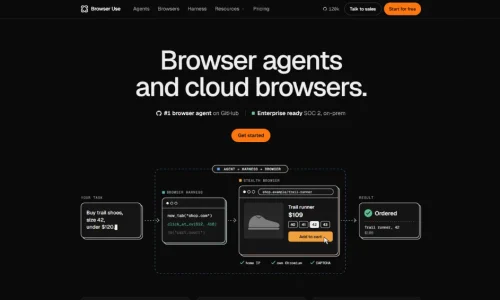
Browser Use AI is an AI-powered browser automation platform that allows intelligent agents to interact with websites, navigate pages, click buttons, complete forms, and extract information automatically. Instead of manually performing repetitive browser tasks, users can provide instructions in natural language and let an AI agent execute the workflow.
Browser Use combines an open-source Python framework with cloud-based browser infrastructure and a hosted Agents API. It is useful for developers, businesses, researchers, and automation teams that want to build intelligent web workflows.
In this guide, we explore how Browser Use AI works, its features, pricing, installation process, practical applications, and alternatives.
What Is Browser Use AI?
Browser Use is an AI browser automation platform designed to help AI agents interact with websites like human users.
Traditional automation tools generally require developers to write specific instructions for every browser action. Browser Use takes a different approach by allowing an AI agent to understand a task and decide which actions are necessary.
For example, imagine you need to collect product information from an online store.
You could instruct an AI agent to:
“Open the website, search for wireless headphones, collect product names and prices, and organize the results.”
The agent can navigate the website, inspect available information, interact with page elements, and return structured results.
Browser Use supports three main ways to work:
- Open-source Python library: Build and run your own browser agents.
- Browser Use Cloud: Access managed cloud browsers and hosted agent execution.
- Browser Harness: Connect coding agents such as Claude Code and Codex to a browser.
These options make Browser Use suitable for both individual developers and organizations building larger automation systems.
How Does Browser Use AI Work?
Browser Use follows an agent-based workflow that combines an AI model with browser interaction capabilities.
1. Give the AI Agent a Task
Start by describing the website activity you want to automate.
For example, you might ask an agent to find product information, navigate a dashboard, or collect publicly available business details.
2. Analyze the Website
The agent examines the browser page using available page information and visual context.
It uses this information to understand buttons, links, input fields, menus, and other interactive elements.
3. Perform Browser Actions
Based on its understanding, the agent can navigate pages, click elements, fill forms, scroll through content, and interact with multiple websites.
4. Handle Multi-Step Workflows
Browser Use can maintain context while completing a sequence of actions.
For example, an agent might search for a product, open its details, collect specifications, and move to another listing.
5. Return the Results
After completing the task, the agent can return information in a structured format.
Developers can use these results in applications, databases, reports, or other AI workflows.
The important difference is that Browser Use does not simply generate instructions. It provides the browser interaction layer needed to execute them.
Key Features of Browser Use AI
1. AI-Powered Browser Automation
Browser Use allows agents to interact with websites using natural-language tasks.
Instead of manually defining every click, developers can describe the desired outcome and allow the agent to plan its actions.
This is useful for repetitive activities involving multiple pages and interactive website elements.
2. Open-Source Python Framework
One of Browser Use’s biggest advantages is its open-source Python library.
Developers can install it, integrate it into existing applications, and customize browser automation workflows.
The project is MIT-licensed, making it accessible for personal and commercial development, subject to the license terms.
It also supports different language models, allowing developers to select an AI provider based on their requirements and budget.
3. Browser Use Cloud
Browser Use Cloud provides managed browser infrastructure for running automation remotely.
Instead of maintaining browser installations and servers, developers can create cloud browser sessions through an API.
Its infrastructure includes features such as:
- Managed Chromium browsers
- Residential proxy options
- CAPTCHA handling
- Saved browser profiles
- Live browser previews
- Optional session recordings
These capabilities are particularly helpful when building automation services that need remote browser access.
CAPTCHA handling is not guaranteed for every challenge, and website access restrictions still apply.
4. Hosted Agents API
The Agents API allows developers to send a task to Browser Use and receive its result.
For example, an application could submit a request to collect the latest information from a supported website.
Browser Use manages the browser session and agent execution, reducing the amount of infrastructure developers need to maintain.
The API supports Python, TypeScript, and direct HTTP requests.
5. Browser Harness
Browser Harness connects AI coding agents with browser capabilities.
It is designed for tools such as Claude Code and Codex that need to interact with real browser sessions while completing development tasks.
It can also work with a local Chrome browser or supported remote browser environments.
This is useful when an AI coding assistant needs to inspect a website, test an interface, or interact with an application during development.
6. Playwright and Puppeteer Compatibility
Browser Use Cloud supports Chrome DevTools Protocol (CDP), allowing developers to connect compatible browser automation tools.
Playwright and Puppeteer can control cloud browser sessions through this connection.
This means developers can combine existing automation scripts with managed browser infrastructure instead of rebuilding their workflows from scratch.
7. Security and Enterprise Features
Browser Use offers enterprise-oriented capabilities, including SOC 2 Type II compliance, signed data processing agreements, and on-premises deployment options.
Enterprise arrangements also provide access to features such as HIPAA support, zero data retention, and EU data residency.
Organizations should verify the exact controls available under their contract before processing confidential information.
How to Install and Use Browser Use AI
Developers can start with the open-source Python library.
Step 1: Install Python
Install Python 3.11 or newer and prepare a development environment.
Step 2: Install Browser Use
If you use the uv package manager, run:
uv add browser-use
Alternatively, create a Python environment and install the package using the appropriate package manager.
Step 3: Configure Your AI Model
Add your preferred model provider’s API key to an environment file.
For example:
OPENAI_API_KEY=your_api_key
Keep API keys private and avoid committing them to public repositories.
Step 4: Create an Agent
Create a Python file and define a browser task.
A simplified example is:
import asyncio
from browser_use import Agent, ChatOpenAI
async def main():
agent = Agent(
task=”Open example.com and report its page title”,
llm=ChatOpenAI(model=”your-supported-model”)
)
result = await agent.run()
print(result.final_result())
asyncio.run(main())
Replace the model identifier with one supported by your installed version.
Step 5: Run Your Automation
Execute the Python file from your terminal.
The agent will use the configured model and browser environment to perform the requested task.
For cloud execution, developers can configure a Browser Use API key and use the cloud browser option.
Browser Use AI Pricing in 2026
Browser Use offers a pay-as-you-go pricing model for its cloud products rather than requiring a standard monthly subscription.
According to its official pricing page checked in November 2026:
| Product | Price | Description |
| Open-source library | Free | Self-managed browser agents |
| Browser Harness | Free | MIT-licensed browser tooling |
| Cloud browsers | $0.02/hour | Managed browser sessions |
| BU Ultrafast agent | $0.006/task | Listed agent task rate |
| Enterprise | Custom | Advanced deployment and support |
Additional costs may apply depending on browser traffic and model usage.
For example, managed residential proxy traffic costs $5 per GB, while direct traffic or your own proxy costs $0.20 per GB.
Eligible new signups receive a one-time $1 cloud credit. Additional credits can be purchased, starting at $5, and top-ups do not expire.
The advertised $0.006 agent price is a specific listed rate, not a guaranteed total cost for every task. Browser time, traffic, and model selection can increase the final amount.
For occasional automation, the pay-as-you-go approach can be convenient. Businesses running hundreds of browser sessions should estimate their monthly usage before deployment.
Real-World Use Cases of Browser Use AI
1. Web Scraping and Data Collection
Researchers can use Browser Use to collect publicly available information from websites.
For example, an agent could visit product pages and organize names, prices, descriptions, and specifications.
Collected information should be checked for accuracy and completeness.
2. Business Research and Lead Generation
Sales teams can automate parts of their business research process.
An agent might navigate public business directories and collect company names, websites, and relevant business information.
Before using collected information for outreach, businesses should follow applicable privacy and marketing regulations.
3. Website Testing
Developers can use browser agents to test common website interactions.
For example, an agent can open a login page, enter test credentials, navigate to a dashboard, and check whether important elements appear.
However, deterministic testing frameworks may be preferable for stable, repeatable test suites.
4. E-commerce Automation
Online sellers can use Browser Use for product research, inventory checks, and publicly available price comparisons.
It can help reduce repetitive browsing across supported online stores.
5. AI Research Assistants
Developers can integrate Browser Use into AI research applications.
An agent could visit several sources, collect relevant information, and return a structured summary.
This makes it useful for applications that need live website interaction rather than relying entirely on static training information.
Browser Use AI vs. Other Browser Automation Tools
Browser Use competes with several tools, but they do not all perform the same function.
| Tool | Main Strength | Best For |
| Browser Use | Autonomous browser agents | Multi-step web tasks |
| Playwright | Reliable browser scripting | Automated testing |
| Stagehand | AI-assisted browser actions | Flexible web interaction |
| Browserbase | Managed browser infrastructure | Remote browser sessions |
| Skyvern | Vision-based browser automation | Complex website workflows |
Playwright is a strong choice when developers know the exact steps a browser should follow.
Stagehand combines AI-based actions with familiar browser automation methods.
Browserbase focuses on providing managed browser infrastructure and supports Stagehand.
Skyvern is another option for automating complex web workflows.
Browser Use is especially interesting when an AI agent needs to interpret instructions, plan actions, and execute multi-step tasks.
Advantages and Limitations of Browser Use AI
Advantages
- Open-source Python framework.
- Natural-language browser automation.
- Supports local and cloud browser workflows.
- Integrates with Playwright and Puppeteer through CDP.
- Hosted Agents API reduces infrastructure management.
- Browser Harness supports AI coding agents.
- Pay-as-you-go cloud pricing.
Limitations
- Complex tasks may require careful prompt design.
- AI agents can make incorrect decisions.
- Browser automation can break when websites change.
- Cloud traffic and model usage create additional costs.
- CAPTCHA handling is not guaranteed.
- Developers need to manage permissions, security, and website compliance.
Browser Use is powerful, but important tasks should include validation, error handling, and human approval where appropriate.
Conclusion
Browser Use AI is a useful platform for developers and businesses looking to automate browser tasks with AI agents. Its open-source library, hosted API, and cloud browsers offer flexibility for different needs. However, consider its costs, reliability, and security before scaling. Overall, Browser Use AI is worth exploring for automating repetitive browser activities and building intelligent web agents.
Want to discover more AI automation platforms and developer tools? Visit RentaAI for practical AI guides, software comparisons, reviews, and productivity tutorials.
Frequently Asked Questions
What is Browser Use AI used for?
Browser Use AI is used to automate website interactions, collect web information, complete browser workflows, and build AI-powered web agents.
Is Browser Use AI free?
Its Python library and Browser Harness are open source and free to use under their MIT licenses. Cloud services use pay-as-you-go pricing.
Does Browser Use AI require Python?
Python is used by the main open-source library, but developers can also use the hosted API through Python, TypeScript, or HTTP requests.
Can Browser Use AI work with Playwright?
Yes. Browser Use Cloud supports CDP connections, allowing Playwright and Puppeteer to control managed browser sessions.
Is Browser Use better than Playwright?
Browser Use is designed for AI agents that interpret tasks and perform multi-step actions. Playwright is better suited to deterministic browser scripts and automated testing. The right choice depends on the workflow.
Can Browser Use AI bypass CAPTCHAs?
Browser Use Cloud includes CAPTCHA-solving capabilities, but success is not guaranteed. Website access controls and applicable rules must still be respected.