
Visit Tool
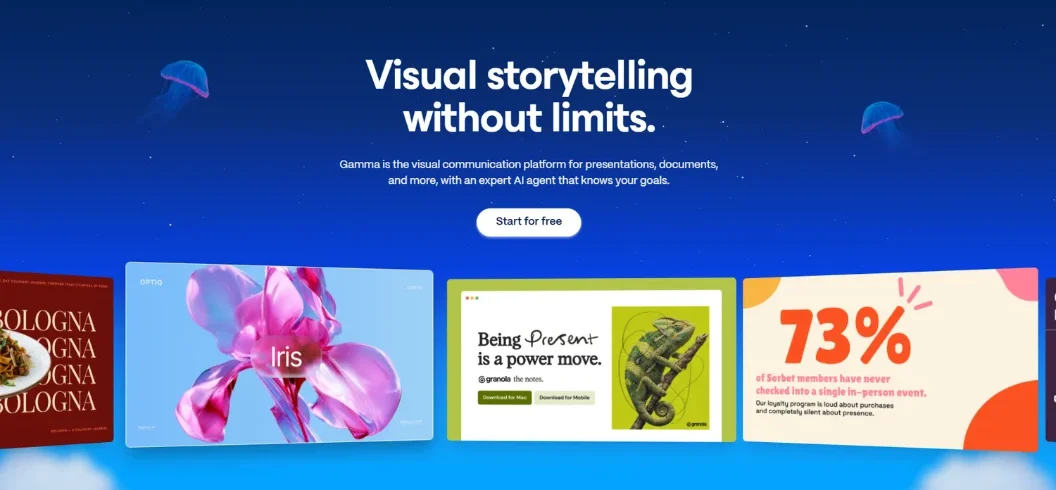
Gamma AI is an AI-powered content creation platform that helps users turn simple text prompts, documents, and existing ideas into professional presentations, documents, websites, and social media content. Instead of spending hours choosing slide layouts, formatting text, and finding images, users can describe what they want and let Gamma generate an editable first draft.
In October 2026, Gamma introduced Gamma 5, a major update that brings conversational AI, research capabilities, improved design controls, and connected workflows into the platform.
Whether you are a student preparing an assignment, a marketer creating a business presentation, or an entrepreneur developing a pitch deck, Gamma AI can simplify your creative workflow.
What Is Gamma AI?
Gamma AI is an AI-powered design and content creation platform focused on making professional-looking visual content easier to produce.
Its original popularity came from AI-generated presentations. Users could enter a topic, choose a design direction, and generate structured slides without manually creating everything in PowerPoint.
Today, Gamma supports several content formats, including presentations, documents, websites, and social media designs.
The platform uses AI models for writing, research, image generation, and design assistance. It combines these capabilities in an editor where users can customize layouts, change themes, edit text, and refine visuals.
For example, imagine a business owner preparing a presentation about a new product. Instead of starting with an empty PowerPoint file, they can provide a product description, target audience, and presentation goal.
Gamma can organize the information into a structured presentation with headings, supporting text, and visuals.
The result is an editable starting point that can be refined before sharing with customers or investors.
What’s New in Gamma 5?
Gamma 5, announced in October 2026, represents a significant change in how users create content.
Previously, Gamma primarily followed a prompt-to-presentation workflow. The newer experience introduces a conversational AI agent that can guide users through the entire creation process.
Its key improvements include:
- Conversational creation: Explain your project and answer follow-up questions instead of writing a perfect prompt.
- AI research: The agent can research information before designing a presentation.
- Improved importing: Bring existing PowerPoint and PDF designs into Gamma while preserving their structure.
- Connected applications: Access information from Slack, Notion, Granola, and other connected services.
- Personalized designs: Describe a visual style or provide inspiration so the output better reflects your brand.
- AI-powered editing: Refine existing content through conversational instructions.
This makes Gamma more than a basic slide generator. It is becoming a broader workspace for transforming information into visual content.
How Does Gamma AI Work?
Gamma uses a simple process to turn ideas into finished content.
Step 1: Enter Your Idea
Open Gamma and describe what you want to create.
For example:
“Create a 10-slide presentation about digital marketing strategies for small businesses.”
You can also upload files, paste existing content, or connect supported applications.
Step 2: Let the AI Build a Plan
With Gamma 5, the AI agent can ask clarifying questions about your audience, purpose, content, and preferred design.
It then develops a proposed structure before generating the final content.
Step 3: Generate the Content
Gamma creates the presentation or document using AI-generated text, layouts, and visual elements.
Users can choose a design direction and refine the generated material.
Step 4: Edit and Customize
After generation, you can modify headings, images, layouts, colors, and other design elements.
The AI agent can also make changes based on additional instructions.
Step 5: Export or Share
When your content is ready, you can share it through a link or export it into supported formats such as PDF and PowerPoint.
This workflow makes Gamma useful for people who want a professional first draft without manually designing every page.
7 Key Features of Gamma AI
1. AI Presentation Generator
The presentation generator is Gamma’s main attraction.
Users can describe a subject and generate a structured presentation containing titles, explanations, images, and visual layouts.
It is particularly useful for business proposals, educational presentations, marketing reports, and startup pitch decks.
Rather than treating every slide as an independent design task, Gamma helps organize information into a connected visual story.
2. AI Documents and Writing
Gamma also supports document creation.
You can generate reports, proposals, educational materials, and other written content using prompts or existing information.
This is helpful when you want to transform rough notes into a more organized document without switching between multiple applications.
3. Website Creation
Gamma can generate simple websites and publish content through shareable web links.
This makes it useful for creating landing pages, project portfolios, event information pages, and basic business presentations.
Custom domains are available on eligible paid plans.
However, Gamma should not automatically be treated as a full replacement for a traditional website development platform, particularly for advanced backend functionality.
4. AI Image Generation
Visual content is an important part of a successful presentation.
Gamma integrates several AI image models, including technologies from providers such as OpenAI, Google, Recraft, and others.
Depending on the selected plan, users can access different image-generation capabilities.
You can create visuals that support your topic instead of relying entirely on generic stock images.
5. Import and Export Options
Gamma supports importing existing materials and transforming them into editable content.
Supported imports include PowerPoint files, PDFs, Word documents, Excel spreadsheets, CSV files, webpages, and eligible shared documents.
You can export your finished work into:
- PowerPoint (PPTX)
- PNG
- Google Slides through PowerPoint export and upload
This flexibility is particularly valuable for professionals who need to continue editing or presenting their work in familiar applications.
6. Templates and Custom Branding
Gamma provides themes and design customization options.
Users can adjust typography, colors, layouts, and other visual elements to create more consistent presentations.
Pro and higher plans provide additional branding capabilities, including custom themes and publishing options.
These features are useful for businesses that produce presentations regularly and want a recognizable visual identity.
7. AI Integrations and API
Gamma supports connections with other applications to make content creation more efficient.
Its integrations include Slack, Notion, and Granola, along with additional connected tools.
The public API also allows developers to connect Gamma with external applications and automated workflows.
For example, a business could use an automation platform to generate presentation drafts from structured information.
API availability depends on the subscription plan.
Gamma AI Pricing in 2026
Gamma provides free and paid subscriptions for individuals and organizations.
According to its official pricing page checked in November 2026, the individual plans include:
| Plan | Monthly equivalent | AI credits |
| Free | $0 | 400 signup credits |
| Plus | $9 | 1,000/month |
| Pro | $18 | 4,000/month |
| Ultra | $90 | 20,000/month |
Paid prices shown are annual-billing equivalents, charged annually: $108, $216, and $1,080 per seat respectively.
Free Plan
The free plan is suitable for trying Gamma and creating simple projects.
It includes 400 initial credits and allows users to generate up to 10 slides per prompt.
However, the initial credits do not automatically refresh every month.
Plus Plan
Plus is designed for users who need more AI capacity and want to remove Gamma branding.
It provides 1,000 monthly credits and supports up to 100 slides per prompt.
Pro Plan
Pro is suitable for professionals who need advanced image models, custom branding, analytics, and API access.
It includes 4,000 monthly credits and additional publishing capabilities.
Ultra Plan
Ultra targets users with heavier AI requirements.
It provides 20,000 monthly credits, access to advanced models, and the ability to publish on more custom domains.
One important detail: AI credits are consumed differently depending on the operation, model, and complexity of the request. Check the current pricing page before choosing a subscription.
How to Use Gamma AI: Practical Beginner Tutorial
Here is a simple example of creating a business presentation.
Step 1: Visit Gamma
Go to gamma.app and create an account.
You can begin with the free plan without entering payment details.
Step 2: Start a New Project
Open your dashboard and select the option to create new content.
Choose the presentation format or another suitable content type.
Step 3: Enter Your Prompt
Try this example:
“Create a professional 12-slide presentation about starting an online business in 2026. Include market research, startup costs, marketing strategies, common challenges, and practical recommendations.”
Step 4: Review the AI Outline
Check the proposed structure before generating the complete presentation.
Make sure the sections follow a logical order and cover your intended audience’s needs.
Step 5: Choose a Visual Style
Select a suitable theme, layout, and image direction.
For a business presentation, use consistent typography, readable colors, and relevant visuals.
Step 6: Edit and Export
Review all generated information, correct factual mistakes, and customize the design.
Finally, export the presentation as a PowerPoint or PDF file.
Gamma AI vs. Other AI Presentation Tools
Gamma competes with several presentation and design platforms.
| Tool | Main Strength | Best For |
| Gamma AI | AI-generated presentations and documents | Fast content creation |
| Canva AI | Templates and creative design tools | Marketing and visual content |
| Beautiful.ai | Automated slide layouts | Professional business decks |
| PowerPoint Copilot | Microsoft 365 integration | Existing PowerPoint users |
| Google Slides with Gemini | Google Workspace integration | Collaborative presentations |
Gamma vs. Canva: Gamma focuses on generating complete visual content from ideas and source materials. Canva offers a broader design ecosystem with extensive templates and creative editing options.
Gamma vs. Beautiful.ai: Gamma is useful for flexible, AI-generated storytelling. Beautiful.ai focuses more heavily on maintaining consistent slide layouts through automated design rules.
Gamma vs. PowerPoint Copilot: Gamma offers a dedicated AI-first creation experience, while Copilot is attractive for organizations already using Microsoft 365 and PowerPoint.
The best option depends on whether you prioritize generation speed, detailed design control, collaboration, or compatibility with existing software.
Advantages and Limitations of Gamma AI
Advantages
- Creates presentations from simple text prompts.
- Supports documents, websites, and social content.
- Provides AI writing and image-generation capabilities.
- Offers import and export options.
- Includes templates and branding customization.
- Supports integrations and API-based workflows.
- Provides a free starting plan.
Limitations
- AI-generated information can contain factual errors.
- Complex presentations may require substantial manual editing.
- Free credits do not automatically refresh.
- Advanced features require paid subscriptions.
- PowerPoint exports may still need formatting adjustments.
- Traditional slide designers may prefer more granular layout control.
The best approach is to use Gamma for creating the initial structure and design, then review the final material before presenting or publishing it.
Final Verdict: Is Gamma AI Worth Using in 2026?
Gamma AI is a useful platform for anyone who wants to turn ideas and existing information into professional visual content without spending hours on manual formatting.
Its presentation generator, document creation, website publishing, AI image tools, and new Gamma 5 agent make it more versatile than a traditional slide generator.
The free plan is a good way to explore its capabilities, while Plus and Pro provide additional options for regular users and professionals.
However, AI-generated content still requires human review, particularly when presentations include statistics, financial information, or important business decisions.
If you want a faster way to create presentations, reports, and visual content, Gamma AI is worth exploring. Visit Gamma to try its free plan, and discover more AI software guides, reviews, and productivity tools at RentaAI.
Frequently Asked Questions
1. Is Gamma AI free to use?
Yes. Gamma offers a free plan with 400 initial AI credits.
2. Can Gamma AI create PowerPoint presentations?
Yes. Gamma creates presentations and exports them in PPTX format.
3. Can beginners use Gamma AI?
Yes. Its simple AI tools make presentation creation easy for beginners.
4. Is Gamma AI better than Canva?
Gamma is better for AI presentations, while Canva offers more graphic design tools.

Leave A Comment