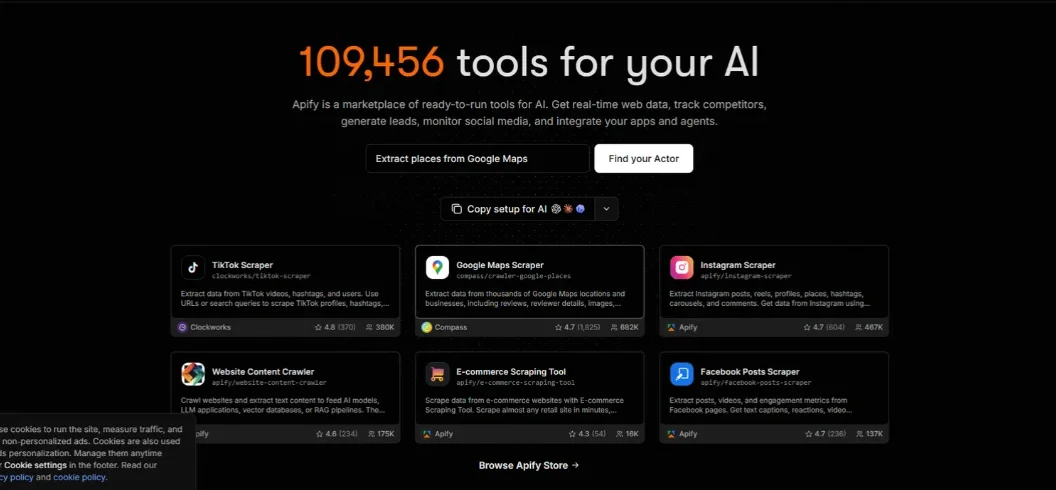

Apify AI is a conversational AI assistant that helps users discover and run web scraping and automation tools using natural language. Instead of searching through hundreds of individual scraping tools and configuring every input manually, users can describe what they want, and Apify AI finds a suitable Actor, prepares its settings, runs the task after confirmation, and presents the results.
Launched in beta in July 2026, Apify AI makes the Apify platform more accessible to developers, marketers, researchers, and businesses. It also connects with a broader ecosystem of AI agents through the Model Context Protocol (MCP).
In this guide, we explore how Apify AI works, its main features, pricing, practical applications, limitations, and alternatives.
What Is Apify AI?
Apify AI is a conversational interface inside Apify Console that allows users to find and execute automation tools through simple instructions.
To understand its purpose, it helps to know about Apify Actors.
Actors are serverless cloud programs designed to perform specific tasks, such as scraping websites, collecting social media information, extracting product details, and automating browser interactions.
Apify Store contains thousands of these ready-made tools, developed by Apify and independent creators.
Traditionally, users needed to search the marketplace, compare tools, understand their input requirements, and configure individual runs.
Apify AI simplifies this process by introducing a conversational assistant.
For example, you could ask:
“Find 100 restaurants in New York and collect their names, addresses, ratings, and website URLs.”
Apify AI can search for a suitable Actor, prepare the necessary inputs, and explain the available pricing before asking for permission to execute it.
This makes it easier to use web automation without manually exploring every technical setting.
How Does Apify AI Work?
Apify AI follows a straightforward workflow that converts ordinary instructions into automated tasks.
1. Describe Your Task
Open Apify Console and access Apify AI through the dashboard chat widget or Store search interface.
Enter a natural-language request explaining what information you need.
2. Find the Right Actor
Apify AI searches Apify Store for an Actor that matches your requirements.
It can display relevant details, including the tool’s purpose, input configuration, and pricing.
3. Configure the Automation
The assistant prepares the Actor’s input fields based on your instructions.
You can review the configuration before proceeding.
4. Approve and Run the Task
Apify AI asks for confirmation before executing an Actor.
This approval step is important because individual Actor runs may consume your account’s usage credits.
5. Review and Analyze Results
After execution, Apify AI retrieves the default dataset and can summarize the collected information or answer questions about it.
For larger projects, the results can also be exported or connected to other applications.
The complete process reduces manual setup while keeping users involved in important execution decisions.
Key Features of Apify AI
Apify AI combines conversational interaction with Apify’s existing automation infrastructure.
1. Natural-Language Actor Discovery
One of its most useful capabilities is finding automation tools without requiring users to know their exact names.
Instead of searching for terms such as Instagram Scraper or Google Maps Extractor, describe the desired outcome.
Apify AI identifies potentially suitable Actors based on the task.
This is helpful when a project requires a specialized scraper that users have never encountered before.
2. Automatic Input Configuration
Different Actors require different settings.
Some need website URLs, while others require search terms, account names, geographic locations, or result limits.
Apify AI can interpret your request and populate the relevant input fields.
Users should still inspect those settings because incorrect inputs can produce irrelevant or incomplete results.
3. Actor Pricing and Information
Before running an Actor, Apify AI can retrieve its documentation, input schema, and pricing information.
This makes it easier to compare available options before spending credits.
It is particularly useful when several Actors offer similar functionality but use different billing models.
4. Automated Web Data Extraction
Apify’s underlying platform supports a wide range of data extraction tasks.
Depending on the selected Actor, users can collect information from search engines, social media websites, online stores, business directories, and other publicly accessible sources.
The collected information can be returned as structured datasets instead of unorganized text.
5. Result Summarization and Questions
After an Actor finishes running, Apify AI can retrieve its default dataset and help explain the results.
For example, after collecting product information, you could ask it to summarize the most common brands or identify records with missing details.
This creates a more convenient workflow for users who do not want to manually inspect every result.
6. Integration With AI Agents Through MCP
Apify also offers an official MCP server at https://mcp.apify.com.
MCP stands for Model Context Protocol, an open standard that allows compatible AI applications to connect with external tools.
Through the Apify MCP server, applications such as ChatGPT, Claude, Cursor, and other compatible agents can discover and execute Actors.
This is different from the Apify AI chat interface: Apify AI works inside Apify Console, while MCP connects Apify capabilities to external AI applications.
How to Use Apify AI: Step-by-Step Tutorial
You do not need to develop a custom scraper to try Apify AI.
Step 1: Create an Apify Account
Visit Apify’s official website and create an account.
The free plan provides an opportunity to explore the platform before purchasing a subscription.
Step 2: Open Apify Console
After signing in, open your dashboard.
Look for the Apify AI chat widget or use the Apify Store search interface.
Step 3: Enter a Natural-Language Prompt
Try a simple request such as:
“Find 50 publicly listed software companies and collect their company names, websites, and descriptions.”
Be specific about the information, location, and number of results you need.
Step 4: Review the Recommended Actor
Apify AI will search for an appropriate tool.
Review its description, input settings, and pricing before approving execution.
Step 5: Confirm the Run
Once you approve the proposed configuration, Apify AI starts the selected Actor.
Processing time depends on the website, tool, and size of the requested task.
Step 6: Analyze Your Results
After completion, review the generated dataset.
You can ask follow-up questions or export the information for further analysis.
For larger automated workflows, developers can use Apify’s API, integrations, or MCP server.
Apify AI Pricing in 2026
Apify offers several subscription plans with included platform usage and additional pay-as-you-go charges.
According to its official pricing page checked in November 2026, the main plans are:
| Plan | Monthly Price | Included Usage |
| Free | $0 | $5 |
| Starter | $19 | $19 |
| Scale | $199 | $199 |
| Business | $999 | $999 |
| Enterprise | Custom | Custom |
Paid subscription prices shown are monthly billing rates. Annual billing offers a discount.
One important detail is that Apify uses a credit and consumption-based system.
Depending on the selected Actor, costs can include compute units, proxies, storage, and individual extraction events.
The platform’s standard compute unit rate starts at $0.20 per CU on Free and Starter plans, with lower rates on higher subscriptions.
Apify AI’s conversational interface also has daily usage limits. Actor execution is billed separately according to the selected Actor’s pricing and platform consumption.
For beginners, Free is a sensible starting point. Starter suits smaller recurring projects, while Scale and Business are designed for higher-volume workloads.
Always inspect an Actor’s pricing and estimate the total cost before launching a large extraction job.
Check the official Apify pricing page for the latest details.
Real-World Use Cases of Apify AI
Apify AI can support several practical business and research activities.
SEO Research and Competitor Analysis
Digital marketers can use suitable Actors to collect publicly available search results, website information, and competitor content.
For example, an SEO professional could gather article URLs from selected websites and organize them for content gap research.
Apify supplies the collection infrastructure, while keyword analysis and ranking evaluation may require additional SEO tools.
Lead Generation and Business Research
Sales teams can collect publicly available business information from supported directories.
A lead research workflow might gather company names, websites, locations, and other relevant business details.
Collected information should be verified before adding it to a CRM.
E-commerce Product Research
Online sellers can use specialized Actors to collect product information, displayed prices, and category details from supported websites.
This can help businesses monitor market changes and organize product research.
Results may vary depending on website access and extraction accuracy.
Social Media Research
Researchers can use relevant Actors to collect publicly accessible social media information where permitted.
For example, a marketing team might analyze public posts to understand recurring customer questions or content trends.
AI Agent Development
Developers can connect Apify with AI frameworks through MCP and other integrations.
An AI research assistant could discover a suitable Actor, retrieve web information, and summarize the results as part of a larger workflow.
This makes Apify particularly useful for applications that need access to current external data.
Apify AI vs. Other Web Scraping Tools
Apify competes with several platforms, but each serves a slightly different purpose.
| Tool | Main Strength | Best For |
| Apify AI | Natural-language Actor discovery and execution | AI-powered web automation |
| Firecrawl | AI-friendly web crawling and Markdown extraction | RAG and knowledge bases |
| Browse AI | No-code website data extraction | Business users |
| Bright Data | Web data infrastructure and proxy network | Large-scale data collection |
| Octoparse | Visual scraping workflows | Non-technical scraping projects |
Firecrawl is particularly useful when developers need clean webpage content for AI applications.
Browse AI provides a more visual approach to extracting information from websites.
Bright Data is worth considering for advanced web data infrastructure and enterprise-scale requirements.
Apify stands out through its Actor marketplace, where users can find specialized automation tools rather than building every scraper from scratch.
The best option depends on your technical requirements, target websites, budget, and desired level of automation.
Advantages and Limitations of Apify AI
Advantages
- Natural-language instructions make Actor discovery easier.
- Automatic input configuration reduces repetitive setup.
- Thousands of specialized tools are available through Apify Store.
- Results can be organized into structured datasets.
- MCP connectivity extends Apify to external AI agents.
- The free plan makes initial experimentation accessible.
Limitations
- Apify AI is currently a beta feature.
- Daily conversational usage limits apply.
- Actor execution may create additional costs.
- Extraction quality depends on the selected Actor and website.
- The assistant does not currently replace all Console functions, such as scheduling, publishing Actors, or configuring integrations.
- It has no chat history or long-term memory in its current documented beta scope.
These limitations mean Apify AI is best viewed as a convenient interface to a broader automation platform, not a completely autonomous business solution.
Conclusion
Apify AI makes web scraping and automation more accessible by allowing users to describe their requirements instead of manually searching through technical tools.
Its biggest advantage is the combination of conversational AI, a large Actor marketplace, structured data extraction, and connections to external AI agents.
For marketers, researchers, developers, and businesses, it offers a practical way to automate information collection without building every scraper independently.
However, users should remember that Apify AI is still in beta, Actor costs vary, and extracted information requires validation.
If you want a flexible platform for AI-powered web research and automation, Apify AI is worth exploring.
Ready to discover more AI tools for business and productivity? Visit RentaAI for practical AI software guides, reviews, comparisons, and automation tutorials.
Frequently Asked Questions
1. What is Apify AI used for?
Apify AI automates web scraping, data collection, and website research.
2. Is Apify AI free?
Yes. Apify offers a free plan with $5 in monthly usage credits.
3. Does Apify AI require coding?
No. You can use existing Actors through natural-language instructions.
4. What are Apify Actors?
Actors are tools that automate web scraping, data processing, and browser tasks.

Leave A Comment