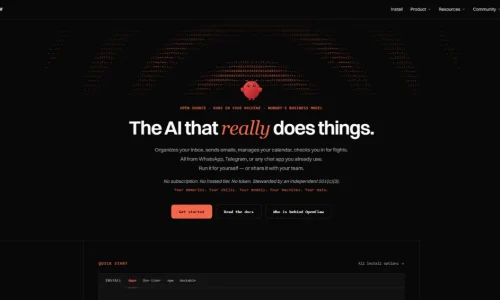
OpenClaw AI is the open-source personal assistant that went viral in early 2026 by doing real tasks from your chat apps. A year on, here is what it actually is, what it costs to run, and how to use it without putting your data at risk.
What Is OpenClaw AI?
OpenClaw is a free, open-source AI agent that runs on your own computer or server and takes orders through messaging apps such as WhatsApp, Telegram, Slack, Discord, and iMessage. Unlike a chatbot that only answers questions, it can act: read and draft emails, browse websites, run commands, manage files, and schedule tasks.
It doesn’t include its own AI model. You connect it to a model you choose, such as Claude, GPT, Gemini, or DeepSeek, or a local model through Ollama. OpenClaw supplies the “hands”: access to your apps, a memory, and the ability to work on a schedule.
Austrian developer Peter Steinberger, who founded the PDF toolkit company PSPDFKit, created it. He described it as “an AI that actually does things.” OpenClaw is MIT-licensed. It is now run by the OpenClaw Foundation, which its README describes as an independent nonprofit.
In short, OpenClaw is the best-known example of agentic AI built for individuals rather than companies.
From Clawdbot to OpenClaw: A Fast, Messy First Year
Few open-source projects have changed this much this quickly:
- November 2025: Steinberger releases a weekend project, first called “WhatsApp Relay” and then Clawdbot, a nod to Anthropic’s Claude.
- January 2026: After a trademark complaint from Anthropic, it becomes Moltbot on January 26. Four days later, on January 30, it settles on OpenClaw. Crypto scammers grabbed the old social handles during the rename.
- February 2026: Security researchers find malware in its skills marketplace and tens of thousands of exposed installs. On February 15, OpenAI CEO Sam Altman announces that Steinberger is joining OpenAI. Altman says OpenClaw will live in a foundation that OpenAI will keep supporting.
- August 30, 2026: OpenClaw 2.0 ships with simpler setup and a rebuilt browser app.
- November 2026: The project turns one, with stable releases still arriving every few weeks (v2026.11.1 landed on November 5).
By August 2026, the GitHub repository had about 385,000 stars and more than 3,000 contributors, which makes it one of the most-starred projects on the platform.
How OpenClaw Works
OpenClaw has a simple core idea: one always-on program on your machine sits between your chat apps and an AI model.
The Gateway
The heart of OpenClaw is the Gateway, a background service that runs on your Mac, Linux machine, Windows PC (often via WSL2), Raspberry Pi, or a cloud server. When you message your assistant on WhatsApp, the Gateway receives it, sends it to your chosen model with the right context, runs any tools the model asks for, and replies in the same chat.
Channels
Channels are the apps you talk to it through. Supported channels include WhatsApp, Telegram, Slack, Discord, Signal, iMessage, Google Chat and Microsoft Teams, plus many more through plugins.
Memory and heartbeat
OpenClaw stores its memory as plain Markdown files on your disk, so it can remember your preferences and past tasks across conversations. A heartbeat wakes the agent on a schedule to check things without being asked, such as your inbox or a daily to-do list. This is what makes it feel proactive.
Skills
Skills are add-ons that teach OpenClaw new abilities, such as controlling a smart home, posting to social media or querying a database. They are shared on a public marketplace called ClawHub. That openness is OpenClaw’s biggest strength and, as you’ll see below, its biggest risk.
If you’ve used developer agent frameworks like CrewAI or LangGraph, think of OpenClaw as a ready-made personal agent rather than a toolkit for building one.
What Can You Actually Do With OpenClaw?
The most useful setups are small and repetitive. Some realistic first jobs:
- Morning briefing: every day at 8 a.m., summarize unread emails, today’s calendar, and three news headlines into one Telegram message.
- Inbox triage: label newsletters, flag invoices, and draft replies for you to approve, without sending anything on its own.
- Research runs: “Find five competitors’ pricing pages and put the plans in a table” while you’re away from your desk.
- Personal admin: track renewals, remind you about bills, and keep a running shopping list in memory.
- Light workflow automation: trigger existing automations in tools like n8n from a chat message.
The pattern that works is to start with read-only tasks, review the results for a week, then allow it to take actions one at a time.
How Much Does OpenClaw Cost to Run?
The software is free. What you pay for is the AI model behind it and, optionally, somewhere to host it.
These are community estimates, not official figures:
| Cost item | Typical range |
| OpenClaw software | $0 (MIT license, no paid tier) |
| Model API, light use | About $10–30 a month |
| Model API, typical use | About $30–70 a month |
| Model API, heavy automation | About $100–150+ a month |
| Cloud hosting (optional) | From about $24 a month on DigitalOcean’s 1-Click deploy |
The highest hidden cost is the heartbeat. An agent that checks your inbox every 15 minutes makes about 96 model calls a day before you ask it anything.
To keep bills down:
- Route simple checks to a cheaper model and save the expensive model for complex tasks. OpenClaw supports per-agent model routing.
- Run a local model through Ollama or LM Studio for private or low-stakes tasks.
- Set a spending cap in your model provider’s dashboard before you start.
- Use a pay-as-you-go API key from a provider such as Anthropic, OpenAI, or Mistral. Community guides warn that routing a consumer chat subscription through OpenClaw can break the provider’s terms.
The Security Problem You Can’t Ignore
OpenClaw’s first year doubled as a lesson in what goes wrong when an agent with deep access goes viral overnight.
- Malicious skills. Koi Security audited all 2,857 skills on ClawHub and found 341 malicious ones. Most came from one coordinated campaign that posed as crypto-trading tools and installed password-stealing malware on macOS and Windows.
- Exposed installs. Censys tracked publicly exposed OpenClaw instances rising from about 1,000 to over 21,000 in under a week. Later scans by SecurityScorecard counted more than 135,000 across 82 countries, many with no authentication.
- A serious vulnerability. CVE-2026-25253, rated 8.8 out of 10, allowed one-click remote code execution on vulnerable instances before it was patched.
- Corporate pushback. Several Korean tech companies, including Kakao, Naver, and Karrot, reportedly banned it internally.
The project has responded with security fixes, a VirusTotal partnership for scanning skills (February 2026), and a built-in openclaw security audit command. The underlying risk remains, though: you are giving an AI model the keys to your accounts. A malicious skill, or a prompt injection hidden in an email or webpage, can turn that access against you.
The same debate is happening at AI labs. We covered how Anthropic deploys AI agents to audit models for safety.
A Safer Way to Start: 7-Step Checklist
If you want to try OpenClaw, this setup limits the damage if something goes wrong:
- Install only from official sources. Use the official npm package (npm install -g openclaw@latest, then openclaw onboard) or the GitHub repo. Anything still using the Clawdbot or Moltbot names is likely fake.
- Use a separate machine or account. A spare Mac mini, a Raspberry Pi, or a dedicated cloud server is better than your main laptop.
- Never expose the Gateway to the internet. Keep it local, or reach it through a private network such as a VPN or Tailscale.
- Create separate accounts for the agent. Give it its own email alias and limited calendar access, not your primary accounts.
- Treat every skill as untrusted. Install as few as possible, read their code, and avoid anything related to crypto or “wallet” tools.
- Require approval for risky actions. Sending, deleting, paying, and posting should always need your confirmation.
- Audit and update regularly. Run an OpenClaw security audit –deep after every update, and update often; fixes ship every few weeks.
OpenClaw vs Hosted AI Assistants
The main alternative is a hosted assistant, such as ChatGPT’s agent features, Claude, or managed OpenClaw hosting services.
OpenClaw gives you control. Your memory files and credentials stay on your hardware, you choose and swap models freely, and you can inspect every line of code. It also works inside the chat apps you already use.
Hosted assistants give you convenience and guardrails. There’s nothing to install or patch; the provider handles security, and costs are usually a flat subscription. The trade-off is that your data lives on their servers and you work within their limits. See our Claude review for one hosted option.
For context, earlier autonomous-agent projects like Auto-GPT showed the idea in 2023 but stayed mostly experimental. OpenClaw is the first to reach everyday users at scale, largely because it lives in your chat apps instead of a separate interface.
Who Should (and Shouldn’t) Use OpenClaw
OpenClaw is a good fit if you:
- Are comfortable with the command line, servers, and basic security
- Want a private, always-on assistant and are happy to spend an afternoon setting it up
- Can dedicate a separate device or server to it
Skip it, or use a hosted assistant, if you:
- Want something that works out of the box with no maintenance
- Would need to connect work accounts your employer hasn’t approved
- Handle sensitive client, health, or financial data you can’t risk exposing
Conslusion
OpenClaw AI showed what a personal agent can do when it lives where you already chat. Its first year also showed how quickly that power can backfire. If you’re technical, start small, isolate it, and keep a human in the loop. If you’re not, a hosted assistant is the safer choice for now.
Looking for the right AI agent for you? Browse our full directory of AI tools to compare agents, assistants, and automation tools side by side.
Frequently Asked Questions
Is OpenClaw AI free?
Yes. The software is free and MIT-licensed. You pay only for the AI model you connect (roughly $10–70 a month for most users, per community estimates) and any hosting.
Is OpenClaw owned by OpenAI?
No. Its creator, Peter Steinberger, joined OpenAI in February 2026, but the project moved to the independent OpenClaw Foundation. OpenAI supports the foundation financially.
Is OpenClaw safe to use?
It can be, with care. Its first year included malicious skills and many exposed installs. Run it on a separate machine, never expose it to the internet, limit skills, and require approval for risky actions.
What were Clawdbot and Moltbot?
They were OpenClaw’s earlier names. Clawdbot became Moltbot after a trademark complaint from Anthropic in January 2026, and Moltbot became OpenClaw four days later.
Which AI models work with OpenClaw?
Most major models, including Claude, GPT, Gemini, and DeepSeek, plus local models through Ollama or LM Studio. You can route different tasks to different models.