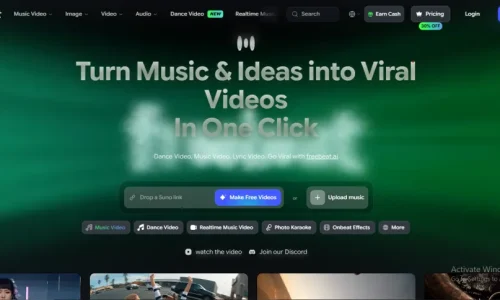
Freebeat AI is an AI-powered platform designed to turn music into videos and other visual content. Instead of manually matching every scene, transition, effect, and caption to a song, creators can use AI to analyze their music and build synchronized visuals.
The platform is designed for musicians, singers, producers, DJs, AI music creators, YouTubers, and social media creators. It includes tools for AI music videos, lyric videos, dance videos, music visualizers, animated album covers, lip-sync, image generation, and video editing.
Freebeat AI focuses on a music-first workflow, meaning the song is used as the foundation for the visual content.
What Is Freebeat AI?
Freebeat AI is an AI music video generator that analyzes a song and creates visual content based on its rhythm, beat, structure, and energy.
Users can upload supported audio files or use music from supported online sources. The AI then analyzes the track and uses the information to help plan scenes, timing, transitions, and visual effects.
According to Freebeat’s current product information, its music analysis considers elements such as BPM, beat patterns, song sections, and energy changes. This allows generated visuals to follow the structure of the music rather than appearing as unrelated clips.
How Does Freebeat AI Work?
Using Freebeat AI generally involves a few basic steps.
1. Add Your Music
The first step is to upload a song or use a supported music link.
Freebeat currently supports audio formats such as MP3, WAV, and M4A. Its workflows also support sources including Suno, Udio, YouTube, TikTok, and other supported platforms.
2. AI Analyzes the Song
After the music is added, Freebeat analyzes the audio.
It can identify information such as:
- BPM and rhythm
- Beat patterns
- Song sections
- Energy changes
- Musical timing
- Vocal sections
This information helps determine how the visuals should change throughout the video.
3. Select a Video Style
Creators can choose the type of content they want to create.
Depending on the available workflow, options include:
- Singing music videos
- Storytelling videos
- Dance videos
- Abstract music videos
- Realtime music videos
- OnBeat effects
You can also provide instructions describing the characters, locations, mood, visual style, and story.
4. Generate the Video
Freebeat uses AI to create the visual scenes and synchronize them with the music.
The platform is designed to create longer music-video projects, with current product information supporting videos of up to approximately six minutes.
5. Edit and Export
After generation, the video can be adjusted using the built-in editing tools.
Creators can work with lyrics, captions, effects, filters, logos, and other visual elements before exporting the final video.
Freebeat AI Features
Freebeat AI includes several tools focused on music and visual content creation.
AI Music Video Generator
The main Freebeat AI feature is its music video generator.
It uses a song as the starting point and creates visual scenes around the music. This can be used for full music videos, promotional clips, performance videos, and social media content.
Beat Synchronization
Freebeat AI is built around beat-aware video creation.
The platform analyzes the rhythm and timing of a song so that scene changes, camera movements, and effects can follow important musical moments.
This is especially useful for music with noticeable beats, drops, and changes in energy.
AI Storytelling
Freebeat can create story-driven music videos.
Creators can describe characters, locations, events, and a general storyline. The AI can then use those instructions to build a sequence of visual scenes around the song.
This allows a music track to become the soundtrack for a visual story.
Singing Music Videos
Freebeat also supports singing and performance-focused videos.
Creators can generate an AI character or use a reference character and create scenes where the character appears to perform the song.
This provides another way to create music content without recording a traditional performance video.
AI Lip Sync
The platform includes AI lip synchronization for singing videos.
Lip sync connects the character’s mouth movements with the vocals in the audio. Freebeat currently states that its lip-sync technology supports more than 100 languages.
This can be used for:
- Virtual singers
- AI characters
- Animated performers
- Music videos
- Multilingual content
Character Consistency
AI-generated characters can sometimes change appearance between scenes. Freebeat provides character reference, and Character Bible features to help maintain a consistent character.
Creators can establish details such as appearance, clothing, and visual identity and use them across different scenes.
This is useful for longer storytelling music videos where the same character appears multiple times.
Dance Video Generator
Freebeat also provides AI dance-video creation.
Music can be used as the foundation for dance-related visuals, making the feature suitable for dance content, music promotion, social media clips, and choreography concepts.
Abstract Music Videos
Not every song needs a storyline or singing character.
Freebeat’s abstract workflows can create visual experiences based on the music without requiring a traditional narrative.
These visuals can work well with:
- Instrumental music
- Electronic music
- Ambient tracks
- Experimental music
- Background music
OnBeat Effects
Freebeat includes music-reactive effects designed to respond to the rhythm of a song.
These effects can be used for:
- Music visualizers
- Beat effects
- Dynamic backgrounds
- Transitions
- Short promotional videos
The platform currently lists hundreds of OnBeat effect templates.
AI Video Editor
Freebeat includes a browser-based editor for making changes after AI generation.
Creators can edit or add:
- Lyrics
- Captions
- Text
- Filters
- Effects
- Logos
- Watermarks
- Visual elements
The editor also provides tools for working with individual shots and regenerating selected sections.
Lyrics and Caption Tools
Lyrics are an important part of music-related video content.
Freebeat can create synchronized lyrics and captions for videos. It supports timed lyrics and karaoke-style text effects, making it possible to create lyric-focused content around a song.
Freebeat also provides AI image-generation capabilities.
Generated images can be used for:
- Music-video scenes
- Character references
- Album artwork
- Backgrounds
- Promotional graphics
This connects image creation with the broader video workflow.
Animated Album Covers
Creators can turn static album artwork into animated visual content.
Animated covers can be useful for music releases, social media promotion, streaming-platform visuals, and short promotional clips.
Music Visualizers
Freebeat can create visualizers that react to music.
Instead of using a traditional storyline, these videos focus on movement, effects, colors, shapes, and other visual elements that respond to the audio.
Freebeat AI Supported Formats
Freebeat provides different aspect ratios for different platforms.
Common formats include:
| Format | Common Use |
| 16:9 | YouTube and desktop video |
| 9:16 | TikTok, Reels and Shorts |
| 1:1 | Square social posts |
| 4:5 | Social media feeds |
The platform also provides different output resolutions depending on the account and workflow, including 720p, 1080p, and 4K upscaling on eligible options.
Freebeat AI Music Sources
Creators can use their own audio or supported online music sources.
Freebeat currently supports workflows involving platforms such as:
- Suno
- Udio
- YouTube
- TikTok
- SoundCloud
- Stable Audio
- Riffusion
Direct audio uploads can also be used with supported file formats.
Is Freebeat AI Free?
Freebeat AI provides a free starting option.
The current platform information lists 500 free credits for new users. Free usage can include restrictions such as shorter generation limits and watermarked exports.
Paid plans provide additional credits and access to more generation capabilities.
Because pricing, credits, and included features can change, users should check the current Freebeat pricing page before subscribing.
Who Can Use Freebeat AI?
Freebeat AI can be used for several types of music and content projects.
- Musicians: Artists can create music videos, lyric videos, visualizers, and promotional clips.
- AI Music Creators: Creators using AI music platforms such as Suno or Udio can turn their generated songs into visual content.
- YouTubers: YouTube creators can produce full-length music videos and shorter promotional clips.
- DJs and Producers: Beat-reactive effects and abstract visuals can be used with electronic and instrumental music.
- Social Media Creators: Vertical video formats can be used for TikTok, Instagram Reels, and YouTube Shorts.
- Virtual Artists: Character consistency and lip-sync tools can be used to create virtual performers and AI music characters.
Conclusion
Freebeat AI brings music analysis, AI video generation, visual effects, lyrics, characters, lip sync, image generation, and editing into one music-focused platform.
The process starts with a song, which the AI analyzes to understand its rhythm, structure, and energy. Creators can then choose a visual direction and generate music videos, storytelling scenes, singing performances, dance videos, abstract visuals, lyric videos, or music-reactive content.
With support for multiple aspect ratios, different audio sources, character consistency, captions, effects, and editing tools, Freebeat AI provides a complete workflow for turning music into visual content.
Frequently Asked Questions
Is Freebeat AI free to use?
Yes, Freebeat AI offers a free starting option with 500 credits for new users. Free usage may include limits such as shorter videos and watermarked exports.
What can you create with Freebeat AI?
Freebeat AI can create music videos, lyric videos, dance videos, music visualizers, animated album covers, and other music-related visual content.
What music sources does Freebeat AI support?
Freebeat AI supports direct audio uploads and works with sources such as Suno, Udio, YouTube, TikTok, SoundCloud, Stable Audio, and Riffusion.
Does Freebeat AI support different video formats?
Yes. Freebeat AI supports multiple aspect ratios, including 16:9, 9:16, 1:1, and 4:5, making it suitable for platforms such as YouTube, TikTok, and Instagram.