
Visit Tool
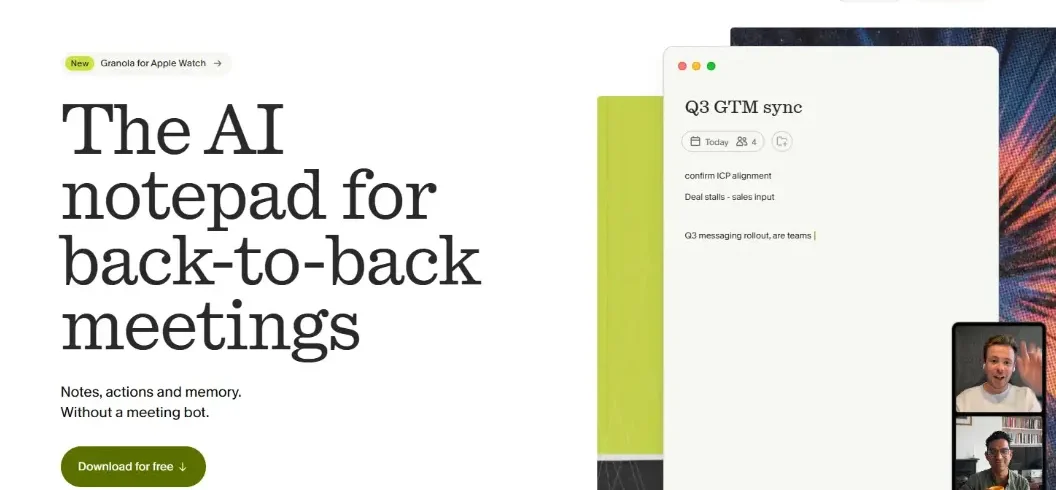
Granola AI is an AI-powered meeting notepad that automatically transcribes conversations and transforms them into organized notes, summaries, decisions, and action items without adding a recording bot to your call. It works with popular meeting platforms, including Zoom, Google Meet, and Microsoft Teams, helping professionals focus on conversations instead of typing everything manually.
In 2026, Granola also offers AI chat, meeting history, calendar integration, and tools for sharing meeting knowledge across teams.
But how effective is Granola AI, what does it cost, and is it better than traditional meeting assistants? This guide explores its capabilities, limitations, privacy practices, and practical uses.
What Is Granola AI?
Granola AI is an intelligent note-taking application designed for professionals who attend frequent meetings.
Its primary purpose is to capture key information from conversations and turn it into useful notes.
Unlike many AI meeting assistants, Granola does not need to send a separate participant into your video conference.
Instead, its desktop application captures meeting audio through your device and processes the conversation into a transcript.
Granola then combines that transcript with notes you write yourself to create organized meeting summaries.
For example, imagine attending a client meeting about a new website project.
During the conversation, you write a few reminders about design changes, deadlines, and customer expectations.
Afterward, Granola can organize the discussion into a summary containing decisions, project requirements, and follow-up tasks.
This approach makes Granola particularly attractive to consultants, founders, sales professionals, project managers, and remote teams.
How Does Granola AI Work?
Granola follows a workflow built around three stages: before, during, and after meetings.
Before the Meeting
Granola connects with supported calendar services to display upcoming meetings.
Its paid pre-meeting briefing features can provide context about attendees and previous conversations, making it easier to prepare.
During the Meeting
Users start a Granola note when they want transcription.
The application captures audio from the meeting and allows users to type their own observations.
Unlike bot-based notetakers, Granola does not appear as another participant in the video conference.
After the Meeting
Granola processes the transcript alongside your notes to generate a structured summary.
The output can highlight discussion topics, decisions, next steps, and responsibilities.
Users can edit the results, share them, or ask follow-up questions using Granola Chat.
The objective is not simply recording conversations. It is turning meeting information into useful work.
Key Features of Granola AI
Granola offers several functions intended to reduce meeting-related administrative work.
1. Bot-Free Meeting Transcription
Granola’s most recognizable feature is its ability to transcribe meetings without inviting an additional recording participant.
This makes the meeting interface less crowded and allows the notepad to function across different conferencing services.
However, bot-free operation does not mean participants should be unaware of transcription.
Users should notify attendees and obtain any consent required by company policy or applicable law.
2. AI-Generated Meeting Summaries
Granola converts conversations into readable summaries.
Instead of reviewing every sentence in a transcript, users can focus on the topics and conclusions that matter.
For example, a project meeting summary might identify approved design changes, outstanding technical questions, and the next delivery deadline.
The generated notes can be edited when details require clarification.
3. Personalized Note Enhancement
A useful distinction is that Granola combines AI-generated information with notes written by the user.
You can record specific observations during a discussion, and Granola uses those notes as additional context.
This creates an opportunity to produce summaries focused on your responsibilities rather than a generic recap.
4. Granola Chat
Granola Chat allows users to ask questions about meeting information.
You might ask:
- What were the main decisions from yesterday’s client call?
- Which tasks were assigned to the marketing team?
- What concerns did the customer raise about pricing?
Depending on your subscription, Granola can work with individual meetings or broader meeting history.
This turns previous conversations into a searchable knowledge resource.
5. Calendar Integration
Granola supports Google Calendar and Outlook integrations.
Calendar synchronization helps associate meeting notes with event information, including titles, schedules, and attendees.
This can make organizing meeting history easier than managing unrelated text documents.
6. Custom Templates and Team Collaboration
Users can customize the structure of their meeting notes.
A sales professional might prioritize objections and follow-ups, while a project manager may want decisions, blockers, and deadlines.
Shared folders help teams organize and collaborate around meeting information.
7. AI and Productivity Integrations
Granola supports integrations with tools such as Slack, Notion, HubSpot, Attio, and Zapier.
Its Model Context Protocol (MCP) connectivity also allows compatible AI applications, including ChatGPT and Claude, to access permitted meeting context.
Available features and data access depend on the subscription and workspace settings.
How to Use Granola AI: Step-by-Step Guide
Getting started with Granola requires only a few steps.
Step 1: Visit the Official Website
Open granola.ai and select the option to get started.
Choose the application suitable for your device.
Granola supports macOS, Windows, iOS, and Android.
Step 2: Create Your Account
Sign in using a supported Google or Microsoft account.
Follow the setup instructions and review the permissions requested by the application.
Step 3: Connect Your Calendar
Connect your calendar to display upcoming events within Granola.
You can select a scheduled meeting and prepare notes before the conversation begins.
Step 4: Start Taking Notes
Open the relevant meeting note and start transcription when appropriate.
Granola accesses the necessary device audio while allowing you to write additional points.
Inform participants before transcription begins.
Step 5: Review Your Meeting Summary
When the meeting finishes, inspect the generated notes.
Check names, figures, assigned tasks, and important decisions against your recollection.
Correct any errors before sharing information with colleagues or customers.
Step 6: Share or Reuse Your Notes
You can share permitted notes with teammates or transfer information into connected productivity tools.
For example, a project manager can use the meeting summary to prepare a task list.
This final step is where note-taking becomes an actionable workflow.
Granola AI Pricing in 2026
Granola provides three main subscription plans.
According to its official pricing page checked in October 2026:
| Plan | Price | Main Features |
| Basic | $0/user/month | AI notes, 30-day history, templates, AI chat |
| Business | $14/user/month | Unlimited history, advanced integrations, API access |
| Enterprise | $35/user/month | Advanced security, SSO, administration, analytics |
The free Basic plan allows users to create unlimited meeting notes, but access to meeting history is limited to 30 days.
Business includes extended history, advanced AI capabilities, and additional integrations.
Enterprise is designed for organizations requiring centralized security and administrative controls.
These figures reflect the advertised per-user pricing; confirm billing conditions directly before subscribing.
For someone attending occasional meetings, Basic may provide enough functionality.
Professionals who regularly need to retrieve older conversations may benefit more from Business.
Organizations with stricter security or compliance requirements should assess Enterprise carefully.
See the official Granola pricing page for current details.
Is Granola AI Safe and Private?
Privacy deserves attention whenever software processes workplace conversations.
According to Granola’s published security documentation, the application does not retain meeting audio recordings after transcription. It stores transcripts and the notes users provide.
The company states that notes are private by default and that information is encrypted in transit and at rest.
Granola also reports SOC 2 Type II compliance and offers enterprise security controls.
However, there is an important distinction concerning AI model training.
Granola states that third-party AI providers cannot use its customers’ data to train their own models.
Granola itself may use anonymized customer information to improve its models unless users opt out. Enterprise accounts have training disabled by default.
Therefore, users should review privacy settings before discussing confidential business information.
Also, not adding a meeting bot is not equivalent to obtaining permission to transcribe.
Granola provides transparency features to notify participants, but individuals and organizations remain responsible for following applicable recording and consent requirements.
You can review these details on Granola’s security page.
Granola AI vs. Other AI Meeting Assistants
Granola competes with several established AI note-taking platforms.
| Tool | Main Strength | Best For |
| Granola AI | Bot-free notes and meeting context | Professionals and founders |
| Otter.ai | Live transcription and searchable records | Teams needing transcripts |
| Fireflies.ai | Meeting intelligence and integrations | Sales and business teams |
| Fathom | Meeting recordings and summaries | Individuals and small teams |
| Jamie | Bot-free AI meeting summaries | Privacy-conscious workflows |
Granola stands out through its notepad-first approach.
Otter.ai focuses heavily on transcription and searching conversations.
Fireflies.ai offers capabilities suited to automated meeting workflows and team integrations.
Fathom is worth considering when recordings and video review are important.
Jamie provides another option for people who prefer not to invite a bot into meetings.
No platform is universally best. Your choice should depend on meeting frequency, recording requirements, integrations, pricing, and data policies.
Who Should Use Granola AI?
Granola can support different professional workflows.
- Freelancers and consultants can organize client requirements and remember commitments without relying on scattered handwritten notes.
- Sales teams can capture customer objections, buying signals, and next steps, then transfer relevant information into CRM systems.
- Product managers can summarize stakeholder interviews, feature requests, and roadmap discussions.
- Startup founders can maintain context across investor conversations, hiring interviews, and planning meetings.
- Remote teams can share structured decisions with colleagues who could not attend a meeting.
- For occasional personal conversations, however, a traditional notes application may be sufficient.
Advantages and Limitations of Granola AI
Advantages
Granola reduces manual note-taking and helps users remain focused during conversations.
Its bot-free design avoids adding an extra participant to video calls.
Personalized notes, AI chat, and integrations make meeting information easier to reuse.
The free plan also provides an accessible starting point.
Limitations
AI-generated notes can contain errors, especially with background noise, unfamiliar terminology, or overlapping speakers.
The free plan limits access to older meeting history.
Granola is not the ideal choice for users whose primary requirement is saving complete audio or video recordings.
Some integrations and advanced controls require paid subscriptions.
Users handling sensitive information must also evaluate privacy policies, consent, and organizational requirements.
Tips for Getting Better Results With Granola AI
Use a consistent meeting template so summaries follow a predictable structure.
Write short notes when important decisions occur, rather than relying entirely on automatic transcription.
After each meeting, verify task owners and deadlines.
Keep meeting names descriptive to make historical searches easier.
Review account privacy settings and share notes only with appropriate recipients.
Most importantly, treat AI-generated summaries as editable working documents, not unquestionable records of what participants agreed.
Conclusion
Granola AI is a compelling meeting assistant for professionals who want organized notes without adding a recording bot to their calls.
Its strengths include personalized summaries, AI-powered meeting search, calendar synchronization, and collaboration features.
The free plan is suitable for evaluating the experience, while paid plans add capabilities for heavier professional use.
However, transcription accuracy, privacy requirements, and the need for permanent recordings should influence your decision.
If your goal is to turn meetings into clear decisions and actionable next steps, Granola is worth evaluating.
Want to discover more AI tools for productivity and business automation? Explore software reviews, tutorials, and AI tool comparisons at RentaAI.
Frequently Asked Questions
What Is Granola AI Used For?
Granola AI transcribes meetings and creates organized notes, summaries, decisions, and action items.
Is Granola AI Free?
Yes, Granola offers a free Basic plan with unlimited meeting notes and limited history.
Does Granola AI Record Meetings?
Granola captures meeting audio for transcription without adding a recording bot to the call.
Is Granola AI Safe to Use?
Granola provides encryption and privacy controls, but users should review its policies and obtain required meeting consent.

Leave A Comment