Tome AI is an AI-powered presentation and storytelling system that enables individuals to make pitch decks, portfolios, websites, and visual stories within several minutes. Through its intelligent text creation, beautiful auto-design layouts, and image creation, Tome AI makes it simpler to create content among students, marketers, founders, educators, and creators. This tutorial describes the functionality of Tome AI, its purposes, uses, cost, use case, drawbacks, comp, and tips and tricks to make the most out of the tool.
What Is Tome AI?
Tome AI is an AI-driven storytelling and presentation generator that is used to create complete visual documents using text prompts. Users do not have to manually design the slides, select colour pallets or format content: they just need to tell what they want and the computer-generated:
- Slide decks
- Web-style stories
- Landing pages
- Case studies
- Portfolios
- Reports
- Brand narratives
Both Tome AI and AI image generation can assist users in transforming an idea into a final product in minutes, with their assistance being facilitated by advanced language models and AI-generated images. Tome AI is an inexpensive and fast solution for creators who desire a visual effect and the ability to create their own slides rather than having to outsource a designer or spend hours formatting and customising their slides.
The difference between Tome AI and the other standard tools is that it focuses on storytelling. All the details, fonts, layouts, imagery, animations, and flow are optimised so that your audience can be clear and visual as far as your message is concerned.
How Tome AI Works
The Tome AI is easy to use and user-friendly. The platform is developed based on AI-driven instructions that deal with structure, content, and visual organisation.
The following is the breakdown of the process:
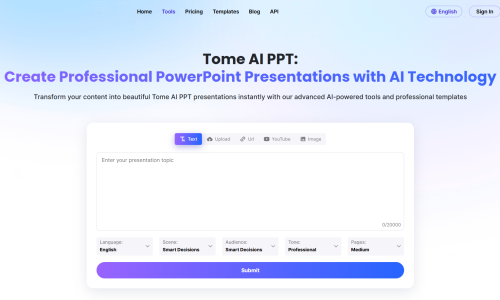
1. Enter a Prompt
You begin by typing a basic command. For example:
- Prepare a 10-slide pitch deck of a travel startup.
- Prepare a presentation about cloud computing to the layperson.
- Prepare a portfolio of a freelance UI designer.
Tome AI will read what you type, analyse your intentions, and make you an outline.
2. Automatic Slide and Content Generation
Once the prompt is submitted, Time AI generates:
- Headings
- Subheadings
- Paragraphs
- Bullet points
- Relevant images
- Graphical layout options
- Slide-by-slide flow
The subject is analysed using the tool, and generates a narrative which can be presented on a professional level.
3. Visual Editing and Customisation
After generation, you can adjust the design using a drag-and-drop editor. You can:
- Replace or regenerate images
- Add new slides
- Change alignment and spacing
- Apply themes or colour styles
- Embed external elements like videos or charts
Such flexibility will make your Tome AI presentation remain unique and personalised.
4. Export, Share, or Publish
Once you finalise your project, Tome AI allows you to:
- Share via link
- Post as a scrolling Web page.
- Export as PDF
- Integrate the content in external platforms.
It is as simple as marketers, teachers and agencies, and creators can distribute professional content in real time.
Top Features of Tome AI
Tome AI is characterised by a broad series of features that are aimed at simplifying the storytelling process. The core capabilities are elaborated below:
1. AI Presentation Generator
This is where the core of the platform lies. Tome AI transforms any thought into a full presentation that has organised content and images. Tome AI does all the heavy lifting, whether it is a business pitch, a product demonstration, a topic to be explained, or a report.
2. AI Image Generation
Users do not need to find stock images; instead, they can create their own images based on specific prompts. These pictures can be styled, toned and be in line with the context of your project and thus make your project appear cohesive.
3. Ready-to-Use Templates
Tome AI has professional templates of:
- Business pitches
- Personal portfolios
- Company introductions
- Sales proposals
- Lesson plans
- Case studies
These templates will assist the user in beginning with time-tested structures.
4. Website & Landing Page Builder
Tome AI also generates lightweight web pages which act as digital tales. It is optimal in portfolios, launches, announcements, and story campaigns
5. Advanced Drag-and-Drop Editor
The interface of the editing is clean, fast, and easy to use. It does not need any design experience- one just needs to press a button and alter something, relocate portions or recreate artificial intelligence.
6. Collaboration Tools
Team collaboration can be achieved in real-time, and Time AI is ideal to be use in workplaces and in remote work.
7. Multimedia Support
Users can embed:
- Videos
- Charts
- Figma designs
- GIFs
- Code blocks
- Social media posts
This gives the presentations more dynamism and interest.
Who Should Use Tome AI?
It can be applied by a large range of users since it can adapt to other industries:
Students
They can develop school projects, research presentations and academic summaries without wasting time on formatting.
Entrepreneurs
The founders of startups are able to make pitch decks, investor updates, and business proposals fast.
Marketers
It is utilised by marketing professionals to create brand stories or content briefs and review campaigns.
Educators
The educators and instructors will be able to create a summary of lessons and attractive learning materials.
Content Creators
It can be used by influencers and digital creators to do storytelling posts, tutorials and visual scripts.
Corporate Teams
Firms apply it by making onboarding documents, training tools, as well as product demonstrations.
Benefits of Using Tome AI
1. Saves Hours of Work
Layout, writing, colour coordination and image selection are all automation-based.
2. Produces Professionally in a Minute.
All the slides produced by It adhere to the principles of clean and modern design.
3. Easy for Beginners
The beautiful presentations can be made by even a user who does not know design or writing.
4. Boosts Creativity
It offers new ideas of stories, visual ideas and plotlines.
5. Best suited in Fast fast-paced environment.
Instant content creation is beneficial to marketers, students and startup teams.
6. Favourable to Next-Gen Mobile Storytelling.
It is Ai-based presentations are also good on any device.
Tome AI Pricing (2025)
It has a free pricing option depending on individuals and businesses:
1. Free Plan
- Limited AI credits
- Standard templates
- Basic sharing options
- Excellent among pupils and amateurs.
2. Pro Plan ($10–$15/month)
- Unlimited AI generations
- Image development at elevated resolutions.
- Brand customization
- Priority speed and new display.
- Full export options
Best in case of professionals and creators.
3. Enterprise Plan
- Team pricing of teams that require:
- Admin controls
- Team collaboration
- Enterprise-grade security
- Majors with workflow software.
Ideal agency and corporate.
Tome AI vs Other Presentation Tools
Here is a more detailed comparison:
Feature | Tome AI | Canva | PowerPoint | Google Slides |
AI Generation | Excellent | Limited | Basic | Basic |
AI Images | Built-in | Via apps | ✘ | ✘ |
Ease of Use | Very easy | Easy | Moderate | Easy |
Website Builder | Yes | ✘ | ✘ | ✘ |
| Templates | Modern | Extensive | Traditional | Basic |
| Collaboration | Strong | Strong | Moderate | Strong |
Limitations of Tome AI
Regarding its disadvantages, even though it is potent, it possesses several shortcomings:
- Other designs resemble unless they have been customised.
- An internet connection is necessary.
- The basic plan has restricted credits.
- And not as customizable as Canva or Figma.
- Not suitable for projects that are intricate in graphic design.
Tome AI and How to Get the Best Results
1. Use Specific Prompts
The more detailed instructions yield high output.
2. Customise After Generation
Customise colours, pictures and designs to make your presentation special.
3. To achieve creativity with AI Image Prompts
Explaining tone, style, lighting, and subject will give images a visual improvement.
4. Keep Slides Minimal
Simple and clean layouts are the best at this AI.
5. Introduce Multimedia to be Interactive.
Your story can be interactive with the help of videos, illustrations and embeds.
Final Thoughts
It is among the best AI tools for visually aesthetic, quick, but modern storytelling and presentations. It can enable you to save time, be more creative and make your ideas so effective, no matter whether you are a student, marketer or business owner, educator or creator. Both its AI-generated text, image-generation capabilities, and easy-to-use design options make it a great option not only to an individual seeking the best outcome without software complexity but also to professionals whose work is enhanced by it.
FAQs About Tome AI
1. Is Tome AI free to use?
Tome AI does have a free (limited credit) plan.
2. What am I able to do with Tome AI?
It is possible to create presentations, pitch decks, landing pages, portfolios, and stories on the web.
3. Is Tome AI able to create self-images?
Yes, and it has inbuilt AI image creation.
4. Better than the traditional tools, is Tome AI?
Tome AI is better at narrating stories and generating them quickly.