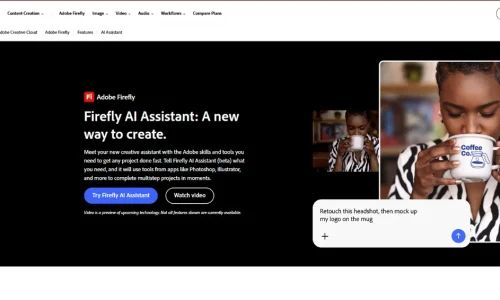
Adobe Firefly Agent is an AI-powered creative assistant that helps users plan, generate, and edit images, videos, and designs through simple natural-language instructions. Officially called the Adobe Creative Agent, it powers Firefly AI Assistant and connects creative capabilities from Photoshop, Illustrator, Lightroom, Premiere, and other Adobe applications.
Instead of manually switching between multiple tools, users can describe their desired result and let the agent organize and execute the required creative steps.
At Adobe MAX on November 10, 2026, Adobe announced significant improvements, including Plan Mode, Model Selector, always-on agents in preview, and expanded creative workflows. These updates make Adobe Firefly Agent an interesting option for designers, marketers, content creators, and businesses.
What Is Adobe Firefly Agent?
Adobe Firefly Agent is an intelligent creative system designed to simplify complex content production.
Its official name is Adobe Creative Agent, which powers Firefly AI Assistant (beta). It works through a conversational interface where users describe their creative goals instead of manually selecting every editing tool.
For example, a marketing professional could upload a product photograph and request:
“Create a complete social media campaign using this product image. Make three promotional graphics, resize them for different platforms, and create a short promotional video.”
The agent can interpret the request, plan the necessary steps, and use compatible Adobe creative tools to produce the requested content.
Its capabilities extend across several creative applications, including:
- Adobe Photoshop for image editing.
- Adobe Illustrator for vector graphics and illustrations.
- Adobe Lightroom for photo editing.
- Adobe Premiere for video production.
- Adobe Firefly for generative image and video creation.
The main idea is to make creative production more conversational and connected while keeping users involved in important creative decisions.
How Does Adobe Firefly Agent Work?
Adobe Firefly Agent uses an agentic AI workflow to transform creative instructions into actions.
1. Understand Your Creative Goal
Users start by entering a natural-language instruction or selecting a predefined creative skill.
For example, you can ask the assistant to create product advertisements, improve photographs, or prepare a video storyboard.
2. Plan the Workflow
The agent interprets the request and identifies which tools and actions are needed.
It can divide a complicated project into smaller steps, such as generating an image, adjusting its composition, adding branding, and preparing different versions.
3. Execute Creative Tasks
The assistant uses available Adobe tools and compatible AI models to generate or modify content.
This can involve image editing, video creation, resizing, retouching, and other supported operations.
4. Review and Refine Results
Users can examine the generated results, request changes, and accept or reject suggested improvements.
This keeps human creative direction involved instead of giving complete control to automation.
5. Save and Export Your Work
Finished projects can be downloaded or saved to Creative Cloud storage, allowing users to continue editing their assets in compatible Adobe applications.
Key Features of Adobe Firefly Agent in 2026
Adobe has introduced several capabilities that make its creative agent more useful for everyday production and professional workflows.
1. Conversational Creative Workflows
The biggest advantage is the ability to control multiple creative operations through natural language.
You do not need to know every tool or editing command.
Simply explain the result you want, and the agent determines an appropriate workflow.
For example, you could request a complete promotional campaign from a single product photograph.
2. Plan Mode
Introduced in Adobe’s November 10, 2026 announcement, Plan Mode gives users more control over how the agent approaches a project.
You can review the proposed plan, edit its steps, and approve it before execution.
Alternatively, you can allow the agent to proceed without manually approving every step.
This is useful for complicated projects where the order of operations matters.
3. Model Selector
The Model Selector allows users to choose an AI model for a particular session.
Alternatively, Auto-Select lets the Creative Agent choose an appropriate model based on the requested output.
Adobe’s creative ecosystem includes its own Firefly models and partner technologies from companies such as Google, OpenAI, Kling, and others.
This flexibility helps creators explore different visual styles and generation capabilities without constantly switching platforms.
4. Brand Preferences and Customization
The agent supports preferences for formats, colors, brand guidelines, characters, and products.
This helps businesses maintain a consistent visual identity across different creative projects.
For example, a company can establish its brand colors and preferred design direction, then use those preferences when generating promotional content.
5. Always-On Creative Agents
Adobe announced always-on agents in preview on November 10, 2026.
These agents are designed to handle recurring creative responsibilities in the background.
Potential tasks include:
- Organizing incoming creative assets.
- Checking content quality.
- Preparing graphics for different channels.
- Managing repetitive production activities.
This capability is particularly interesting for marketing teams that produce large amounts of content regularly.
However, always-on agents are a preview feature, not a fully available standard workflow for every user.
6. Firefly Graph Integration
Firefly Graph is a visual workflow builder that connects AI models, Adobe applications, and creative actions through a node-based interface.
Users can create reusable workflows by connecting different operations.
For example, a creator could build a process that generates a product image, adjusts its appearance, applies branding, and prepares several output formats.
Unlike the conversational agent, Firefly Graph focuses on precise, repeatable workflow construction.
Its beta experience also includes an AI assistant that helps users build and optimize their workflows.
7. Creative Skills and Quick Actions
Adobe provides predefined skills for common creative tasks.
Examples include:
- Batch editing photographs.
- Removing or replacing objects.
- Creating brand kits.
- Producing branded mockups.
- Creating influencer-style promotional videos.
- Developing video storyboards.
The November 2026 Firefly expansion also introduced a larger Quick Actions gallery, including options such as object removal, thumbnail creation, and product advertisement workflows.
These features help beginners get started without writing complicated instructions.
How to Use Adobe Firefly Agent: Step-by-Step Guide
You can start using the assistant through Adobe Firefly’s web interface.
Step 1: Open Adobe Firefly
Visit firefly.adobe.com and sign in using your Adobe account.
Check whether your subscription or free account is eligible for AI Assistant access.
Step 2: Open AI Assistant
Select AI Assistant from the left navigation panel.
This opens the conversational workspace where you can describe your creative project.
Step 3: Enter Your Prompt
Write a clear instruction describing your desired result.
For example:
“Create a professional Instagram advertising campaign for a skincare product. Use a clean background, premium lighting, consistent brand colors, three promotional image variations, and a short product video.”
You can also upload existing images and visual references.
Step 4: Review the Proposed Workflow
Allow the assistant to interpret your request and organize the necessary creative steps.
Where available, use Plan Mode to review and adjust the proposed workflow before execution.
Step 5: Generate and Edit Content
Let the agent perform the requested operations.
Review the results and provide additional instructions if you want to change colors, layouts, images, or other details.
Step 6: Download Your Final Results
Once satisfied, download your finished assets or continue editing them using compatible Adobe applications.
Adobe Firefly Agent Pricing in 2026
Adobe does not list the Creative Agent as a separate standalone subscription. Access is connected to eligible Adobe plans, while many AI-powered actions consume generative credits.
The official US Firefly plans page lists these individual subscriptions:
| Plan | Monthly price | Generative credits |
| Free | $0 | Limited daily generations |
| Firefly Standard | $9.99 | 2,000/month |
| Firefly Pro | $19.99 | 4,000/month |
| Firefly Pro Plus | $49.99 | 10,000/month |
| Firefly Premium | $199.99 | 50,000/month |
Free Plan
The free option allows eligible users to explore Firefly and access a limited number of daily generations.
It is useful for testing the creative assistant before purchasing a subscription.
Firefly Standard
At $9.99 per month, Standard provides 2,000 monthly generative credits.
It is suitable for individual creators who mainly need AI image and vector generation with occasional premium creative tasks.
Firefly Pro
The Pro plan costs $19.99 monthly and includes 4,000 credits.
It also includes Adobe Express Premium and Photoshop on web and mobile.
Firefly Pro Plus
This plan costs $49.99 monthly and provides 10,000 generative credits.
It is more suitable for creators with frequent premium generation requirements.
Firefly Premium
At $199.99 monthly, Premium provides 50,000 generative credits and unlimited access to the Firefly Video Model.
It is designed for users producing large volumes of creative content.
Important: These are Adobe’s listed US monthly prices, not separate Creative Agent fees. AI Assistant actions can consume available credits, depending on the operation. Pricing and eligibility can vary by region and subscription.
Real-World Applications of Adobe Firefly Agent
1. Social Media Marketing
Marketing professionals can use the agent to create promotional graphics, resize assets, and prepare campaign variations.
For example, one product photograph can become multiple social media advertisements.
2. E-commerce Product Advertising
Online businesses can use AI-assisted editing to create product mockups, promotional images, and short advertising videos.
This can help smaller businesses produce more visual content without manually completing every editing step.
3. Video Production
Video creators can use the assistant to develop storyboards, organize scenes, generate supporting visuals, and refine promotional videos.
This is particularly useful for social media advertisements and short-form content.
4. Brand Design
Businesses can establish visual preferences and use them across creative projects.
This helps maintain consistency in logos, colors, typography, and product presentations.
5. Photography and Image Editing
Photographers can use conversational instructions for batch adjustments, object removal, retouching, and image variations.
These capabilities can reduce repetitive editing work while preserving opportunities for detailed manual refinement.
Adobe Firefly Agent vs. Other AI Creative Tools
| Tool | Main Strength | Best For |
| Adobe Firefly Agent | Multi-step creative workflows | Professional creative production |
| Canva Magic Studio | Templates and AI design | Social media graphics |
| Runway AI | AI video generation and editing | Video creators |
| ChatGPT | General-purpose AI assistance and image creation | Ideas and content generation |
| Midjourney | AI image generation | Artistic visual concepts |
Adobe Firefly Agent vs. Canva: Adobe focuses on orchestrating professional creative tools and multi-step workflows, while Canva is particularly accessible for template-based graphics and marketing designs.
Adobe Firefly Agent vs. Runway: Firefly connects image, video, and design workflows across Adobe’s ecosystem. Runway focuses more heavily on AI-powered video creation and editing.
Adobe Firefly Agent vs. ChatGPT: ChatGPT is a general-purpose assistant, whereas Adobe’s agent is designed specifically for creative production and integration with Adobe applications.
Advantages and Limitations of Adobe Firefly Agent
Advantages
- Controls multiple creative workflows through natural language.
- Connects capabilities across Adobe applications.
- Supports image, design, and video production.
- Offers Plan Mode and model selection.
- Helps maintain consistent brand preferences.
- Includes predefined creative skills and Quick Actions.
- Supports repeatable workflows through Firefly Graph.
Limitations
- AI Assistant is still in beta.
- Some features are available only in preview or private beta.
- Advanced actions can consume generative credits.
- Generated content may require manual corrections.
- Access depends on subscription and regional eligibility.
- Partner AI models can have different commercial-use conditions.
Final Verdict: Is Adobe Firefly Agent Worth Using in 2026?
Adobe Firefly Agent represents an important development in AI-powered creative production.
Instead of using separate tools for every editing task, creators can describe their desired results and let an intelligent assistant coordinate multiple creative operations.
Its integration with Photoshop, Illustrator, Lightroom, Premiere, Firefly Graph, and other creative technologies makes it particularly interesting for designers, marketers, photographers, and video professionals.
The addition of Plan Mode, Model Selector, and always-on agents also points toward a future where AI can manage more repetitive creative responsibilities.
However, human direction remains essential for quality, originality, and brand consistency.
If you want to simplify creative production and explore agentic AI, Adobe Firefly Agent is worth trying. Visit Adobe Firefly to explore its capabilities, and check RentaAI for more AI software guides, comparisons, and productivity tools.
Frequently Asked Questions
What is Adobe Firefly Agent?
Adobe Firefly Agent, officially called Adobe Creative Agent, is an AI-powered creative assistant that coordinates tools across Adobe applications to complete multi-step creative projects.
Is Adobe Firefly Agent free?
Eligible free Adobe accounts can access a limited experience with daily generations. Paid subscriptions provide broader access and available generative credits.
Can Adobe Firefly Agent edit images?
Yes. It can coordinate supported image-editing operations such as retouching, removing objects, resizing, and generating variations.
Does Adobe Firefly Agent work with Photoshop?
Yes. The assistant can use capabilities from Photoshop and other compatible Creative Cloud applications through its Firefly web experience.
What is the difference between Firefly AI Assistant and Creative Agent?
Adobe Creative Agent is the underlying agentic technology, while Firefly AI Assistant is the conversational interface through which users interact with it.
Is Adobe Firefly Agent available in 2026?
Yes. Firefly AI Assistant is available in beta, with eligibility depending on the Adobe account, subscription, and region. Some newer capabilities remain in preview or beta.