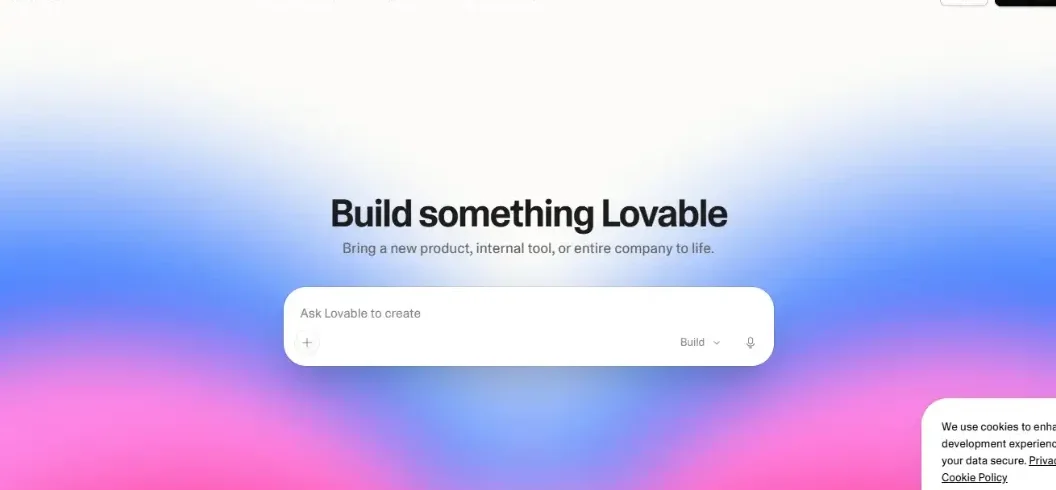

Building a website or web application used to mean learning programming languages, hiring developers, or spending hours arranging elements in a website builder. AI-powered development tools are making that process more accessible.
Lovable AI is one of these tools. It lets users describe an app or website in everyday language and generates the software based on those instructions.
But can Lovable actually build useful applications, and is it worth paying for?
This Lovable AI review explores its features, pricing, workflow, limitations, and alternatives to help you decide whether it fits your project.
What Is Lovable AI?
Lovable AI is an AI-powered website and application builder that turns natural-language instructions into functional software. Users describe what they want to build, and the platform generates an interface, application logic, and supported backend components.
Unlike traditional website builders that rely mainly on dragging and dropping elements, Lovable uses conversational instructions.
For example, you could ask it to create an appointment-booking application with customer accounts, booking forms, and an administrator dashboard.
Lovable can generate an initial implementation and let you refine it through follow-up instructions.
The platform is particularly relevant to entrepreneurs, designers, students, small businesses, and developers who want to accelerate the early stages of software development.
Lovable AI at a Glance
| Category | Details |
| Tool name | Lovable |
| Product type | AI website and web application builder |
| Primary function | Generate applications from natural-language prompts |
| Coding required | Not required for basic building |
| Supported projects | Websites, dashboards, internal tools, SaaS applications, and web apps |
| Hosting | Available through the platform |
| Backend capabilities | Databases, authentication, and application logic |
| Free plan | Available |
| Paid plans | Pro, Business, and Enterprise |
| Best suited for | Rapid prototyping, MVP development, and custom web tools |
How Does Lovable AI Work?
Lovable converts written instructions into application components and code.
Instead of manually designing every screen, you communicate what the software should accomplish.
The process generally involves four stages.
1. Describe Your Project
Start by explaining the type of application you want, its users, important pages, and essential functions.
For example:
Create a modern inventory management web app for a small online store. Include product records, stock quantities, low-stock warnings, and a dashboard. Use a simple layout suitable for desktop and mobile screens.
A detailed prompt gives the AI more context about the intended result.
2. Generate the Application
Lovable interprets your request and generates an initial application.
Depending on the project, this may include navigation, forms, dashboards, data structures, and supporting logic.
The generated result is a starting point rather than a guarantee that every feature is complete or error-free.
3. Improve the Design and Functionality
You can request changes through natural-language instructions.
For example:
- Change the dashboard layout.
- Add product search filters.
- Create an administrator login.
- Improve the mobile navigation.
- Add a form for customer inquiries.
Lovable supports iterative development, allowing users to refine projects instead of restarting them.
4. Test and Publish
Once the application is ready, users can preview and publish it through Lovable’s hosting functionality.
Before releasing an application to real customers, test the user experience, authentication, database permissions, integrations, and error handling.
An AI-generated application still requires quality assurance.
Key Features of Lovable AI
Natural-Language App Development
Lovable’s main feature is its conversational development interface.
You can describe screens, workflows, and application requirements without manually writing the initial code.
This reduces the technical barrier for creating simple applications and prototypes.
However, clear instructions remain important. Vague prompts can produce interfaces that look attractive but do not meet the project’s actual requirements.
AI Website Builder
Lovable can create websites such as landing pages, portfolios, service websites, and product presentation pages.
You can request different layouts, page sections, navigation elements, and visual styles.
This is useful for businesses that need an initial website concept without designing every element manually.
Full-Stack Web Applications
Lovable is not limited to static webpages.
According to its official documentation, it supports applications with interfaces, databases, user authentication, and backend logic.
These capabilities make it useful for projects such as customer portals, appointment systems, and internal business tools.
The complexity of the final application depends on the requirements, implementation quality, and available integrations.
Built-In Hosting and Publishing
Lovable includes hosting and publishing features.
Users can publish projects to a Lovable-provided address, while eligible paid plans support custom domains.
This simplifies the process of sharing a prototype or launching a web-based product.
Integrations and External Services
Lovable supports connections with services that extend an application’s capabilities.
Its official integrations catalog includes services such as Stripe, Shopify, Resend, Google Sheets, and Firecrawl.
These can support workflows involving payments, emails, data, and external information.
Integration setup and suitability depend on the service and the application requirements.
Visual Editing and Iteration
Users can refine generated interfaces through prompts and visual editing.
This is helpful when adjusting text, spacing, navigation, and other design elements.
Developers can also work with the generated code when more precise customization is required.
Security Scanning
Lovable advertises built-in security scanning intended to identify common application vulnerabilities.
This is a useful development aid, but it should not replace independent security testing for applications involving sensitive information, payments, or customer accounts.
Lovable AI Pricing in 2026
Lovable offers a free entry-level option alongside paid subscription plans.
The following prices were listed on its official pricing page when researched on October 26, 2026.
| Plan | Listed starting price | Notable features |
| Free | $0/month | Free grants, limited publishing options, community support |
| Pro | $25/month | 100 monthly Pro credits, custom domains, credit top-ups, badge removal |
| Business | $50/month | 100 monthly Business credits, workspace controls, SSO, security center |
| Enterprise | Custom pricing | Advanced governance, enterprise integrations, audit logs, dedicated support |
These are listed monthly prices. Annual billing may provide discounts.
Is Lovable AI Free?
Yes. Lovable offers a free plan that lets users explore the platform without immediately purchasing a subscription.
However, the free plan has usage and publishing restrictions.
For occasional experiments, the free version may be sufficient. Users planning frequent iterations or commercial projects should evaluate the paid plans and available credits.
Are There Additional Costs?
Potential additional expenses can include credit top-ups, usage-related services, paid integrations, and infrastructure requirements.
Before launching a production application, review the billing terms and estimate your expected workload.
How to Use Lovable AI: Beginner’s Guide
You don’t need an advanced programming background to start building a basic project.
Step 1: Open Lovable
Visit Lovable and create or sign in to your account.
Step 2: Choose a Small Project
Start with a simple application, such as a personal portfolio, task tracker, or business landing page.
Smaller projects are easier to evaluate and improve.
Step 3: Write a Detailed Prompt
Explain the project’s purpose, pages, features, and design preferences.
Example prompt:
Build a responsive task management web application for freelancers. Include a dashboard, task creation form, priority levels, due dates, and task status filters. Use a clean interface with simple navigation. Start with a working basic version before adding advanced features.
Step 4: Review the Generated Result
Inspect the initial application carefully.
Check whether the requested pages and features exist and whether the interface is understandable.
Step 5: Request Improvements
Provide specific instructions to fix missing functionality or improve the design.
Make changes in manageable stages so problems are easier to identify.
Step 6: Test Important Workflows
Test forms, navigation, accounts, data storage, and error messages.
For applications with customer data, verify access controls and database security.
Step 7: Publish Your Application
Use Lovable’s publishing options when you are satisfied with the result.
If you want a custom domain, check whether your subscription includes that capability.
What Can You Build With Lovable AI?
Lovable supports several practical use cases.
Business Websites
Small businesses can use it to create service websites, portfolios, and landing pages.
Internal Management Tools
Teams can build dashboards or internal applications for managing tasks, inventory, and business records.
SaaS MVPs
Entrepreneurs can prototype subscription-based software concepts before investing in more extensive development.
Customer Portals
Businesses can create applications with customer accounts, forms, and data-driven features.
Educational Projects
Students and beginners can experiment with application concepts while learning how software workflows operate.
For a complex commercial product, professional development and security review may still be necessary.
Advantages and Limitations of Lovable AI
Advantages
Accessible for beginners: Users can start building through natural-language instructions.
Faster early-stage development: AI-generated components can reduce the amount of manual setup needed for an initial prototype.
Full-stack capabilities: Lovable supports more than static webpage creation.
Integrated publishing: Hosting and deployment functionality are available within the platform.
Iterative workflow: Users can improve their applications through follow-up prompts.
Limitations
AI output requires testing: Generated code may contain bugs, incomplete features, or unsuitable design decisions.
Complex projects need technical oversight: Advanced integrations, specialized workflows, and performance requirements may need developer involvement.
Usage is plan-dependent: Repeated requests and project iterations can consume available credits.
Security remains your responsibility: Built-in scanning does not guarantee that a published application is secure.
Ongoing maintenance is necessary: Applications need updates, monitoring, and testing after launch.
Lovable AI vs Bolt.new vs Replit
Lovable is not the only platform that allows users to create software through AI instructions.
Two relevant alternatives are Bolt.new and Replit.
| Feature | Lovable | Bolt.new | Replit |
| AI-assisted app creation | Yes | Yes | Yes |
| Natural-language instructions | Yes | Yes | Yes |
| Website development | Yes | Yes | Yes |
| Application backend options | Yes | Yes | Yes |
| Integrated publishing | Yes | Yes | Yes |
| Intended audience | Beginners, founders, and teams | Product builders and developers | Beginners, developers, and teams |
| Free starting option | Yes | Yes | Yes |
Comparison based on publicly documented capabilities rather than a controlled hands-on benchmark.
Lovable vs Bolt.new
Both platforms support prompt-based application building.
Lovable emphasizes conversational full-stack application creation, while Bolt.new provides AI development workflows with code-generation and project-building capabilities.
The better choice depends on the project, preferred workflow, and required technical control.
Lovable vs Replit
Replit combines AI-assisted development with a broader coding and application-hosting environment.
Lovable may appeal to users looking for a conversation-driven app-building workflow.
Replit may be worth evaluating when an integrated coding environment and broader development tooling are important.
For a reliable comparison, build the same small project in each platform and evaluate functionality, correction effort, cost, and deployment experience.
Is Lovable AI Safe to Use?
Lovable includes security-related features, but the security of an application depends on how it is configured and deployed.
Before publishing an application, consider the following:
- Review user authentication and account permissions.
- Restrict database access appropriately.
- Keep API keys and private credentials out of publicly exposed code.
- Validate forms and other user input.
- Review third-party integrations.
- Test payment and customer-data workflows.
- Conduct an independent security review for sensitive applications.
Avoid entering confidential business or customer information into development prompts unless the relevant privacy and data-handling terms have been evaluated.
Who Should Use Lovable AI?
Lovable may be a good fit for:
- Startup founders who want to build an MVP.
- Small business owners who need a custom website or internal application.
- Designers who want to turn concepts into interactive software.
- Students learning about application development.
- Developers looking to accelerate repetitive development work.
It may be less suitable as a standalone solution for businesses with complex regulatory requirements, specialized infrastructure, or demanding security obligations.
In those situations, Lovable can still be useful for prototyping, but expert engineering review is advisable.
Conclusion
Lovable AI is worth trying in 2026 for building websites, prototypes, and web applications using simple text prompts. Its AI-powered features help beginners get started quickly, while the free plan lets users explore its capabilities. However, complex projects still require proper testing, security checks, and technical review.
Frequently Asked Questions
1. What is Lovable AI used for?
Lovable AI builds websites and web apps from simple text prompts, including dashboards, portals, and SaaS prototypes.
2. Is Lovable AI free?
Yes, Lovable offers a free plan with usage limits. Paid plans provide additional credits and features.
3. Can beginners use Lovable AI without coding?
Yes, beginners can build apps using plain-language prompts. Technical skills help with debugging and customization.
4. Can Lovable AI create complete websites?
Yes, Lovable can build and publish websites. Test responsiveness, security, accessibility, and functionality before launch.

Leave A Comment